Synaptics Coralboard™ SL vs. Raspberry Pi 5: Choosing the Right Board for Edge AI

This post compares publicly available specifications. Synaptics is not affiliated with Raspberry Pi Ltd. Raspberry Pi is a trademark of Raspberry Pi Ltd.
Created in partnership with Google Research for products using Coral NPU technology, the Coralboard™ series is a family of edge AI development kits designed to make prototyping energy-efficient AI-enabled products more accessible to developers. Synaptics recently launched the first kit in the serires, the Synaptics Coralboard™ SL. Many developers are familiar with Raspberry Pi 5. It's a natural reference point when evaluating a new development board. So, how does the new Coralboard SL stack up against the most popular general-purpose single-board computer on the market?* Read on to learn more!
TLDR
The Synaptics Coralboard SL is built around energy- and cost-efficiency, on a platform that's production-ready from day one. Its underlying design principle is simple: bring real AI capability to low-power, battery-operated devices by optimizing for performance per watt per dollar. It won't win every raw-speed benchmark against a general-purpose board like the Raspberry Pi 5, but the energy savings are substantial — often several times over, as the numbers below show.
Overview of Synaptics Coralboard SL vs. Raspberry Pi 5
Let's review the similarities and differences between the Coralboard SL and the Raspberry Pi 5.
Purpose
They target different jobs. The Raspberry Pi 5 is a general-purpose Arm Linux computer with a large software and HAT ecosystem, but no on-chip AI accelerator. The Coralboard is built for edge-AI energy-efficiency and production-readiness.
The Processor (System on Chip)
The Coralboard SL is built on the Synaptics Astra SL2619, a dual brain SoC that pairs application-class cores with a dedicated real-time core and an on-chip NPU. The Raspberry Pi 5 is built on the Broadcom BCM2712, a general-purpose application processor with no on-chip NPU.
Coralboard SL (SL2619)
| Raspberry Pi 5 (BCM2712)
|
Size
The Raspberry Pi 5 uses the standard Raspberry Pi board footprint (85mm x 56mm), which is larger than the compact Coralboard.
Coralboard SL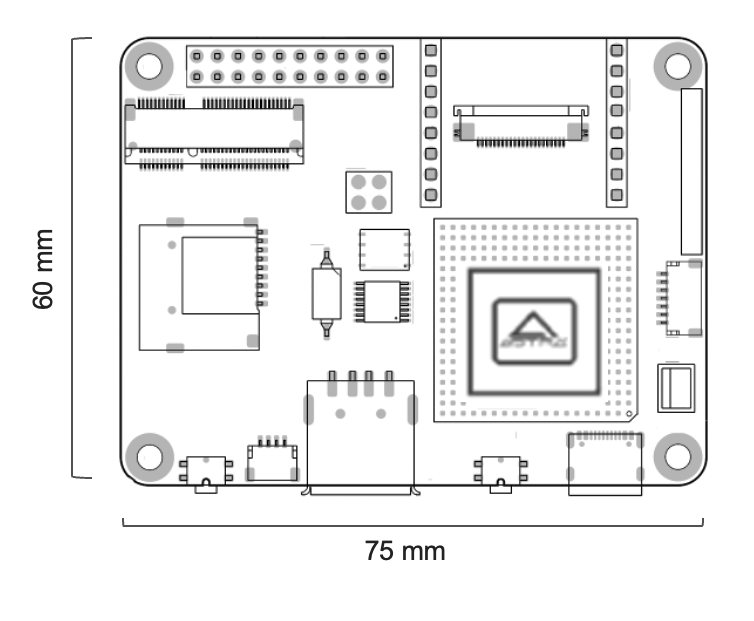 | Raspberry Pi 5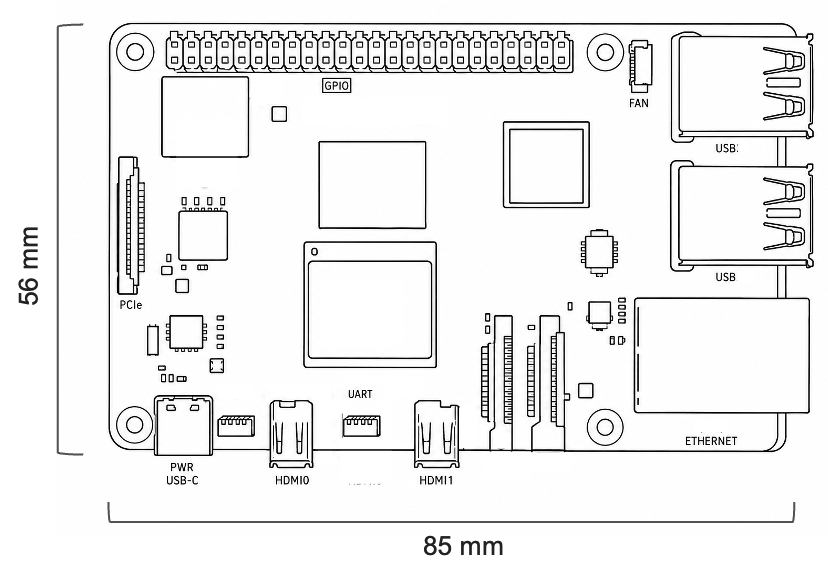 |
Feature Differences
| Feature | Coralboard SL 2GB | Raspberry Pi 5 |
|---|---|---|
| Memory | 2 GB DDR4 (more options coming), see note | up to 16 GB LPDDR4X |
| Storage | micro-SD | micro-SD PCIe 2.0 x1 |
| USB | 1 x USB2 | 2 x USB3 2 x USB2 |
| Wired Networking | Network over USB | Gigabit Ethernet |
| Wireless Networking | add-on Wi-Fi 6E & Bluetooth 5.3 module | on-board Wi-Fi 5 & Bluetooth 5.0 |
| Touch Display | MIPI DSI | MIPI DSI |
| HDMI | add-on micro-HDMI | dual micro-HDMI |
| Camera | MIPI CSI or USB | MIPI CSI or USB |
| Microphone | add-on module with PDM mics or USB | add-on or USB |
| Audio Out | I2S or USB | Add-on or USB |
| GPIO | 20-pin header, MikroBus, QWIIC | 40-pin header |
| Linux | Yocto-Project-based Astra SDK | Raspberry Pi OS |
| RTOS | Zephyr / FreeRTOS | n/a |
AI Acceleration, Models, and Model Optimization
The Coralboard SL is built for energy-efficient edge AI and includes the Torq AI Engine on-chip, which offloads and accelerates model inference directly on the SL2619 with no additional hardware. The Torq AI Engine includes Coral NPU technology and can accelerate many types of models including vision, audio, and transformer-based LLMs. You can use models from popular frameworks such as PyTorch, ONNX, JAX, and TFLite/LiteRT, optimized with the Torq Compiler, based on the open-source industry-standard MLIR / IREE. Read more
The Raspberry Pi 5 has no on-chip NPU. AI acceleration is available as an add-on through the official Raspberry Pi AI Kit / AI HAT+, which uses a M.2 module (up to ~26 TOPS) connected over the Pi 5's PCIe interface. This delivers higher peak throughput, but as a separate module with its own SDK, power consumption, and cost. see below
Battery-Powered Operation
The Coralboard SL has a dedicated battery power input connector and is compatible with 3.7V LiPo batteries with JST-PH 2.0 connectors. The Raspberry Pi 5 only includes a small connector for an RTC coin-cell battery; running the board itself from battery power requires a separate UPS/battery HAT feeding its USB-C power input.
Energy Efficiency
Both platforms support Dynamic Voltage and Frequency Scaling (DVFS), scaling clocks and voltage to the current workload. The Coralboard SL draws meaningfully less baseline power, both because of its lower-power SoC and because it has fewer components on the board.
Additionally, its dual-brain SL2619 architecture lets the Arm Cortex-A55 application cores power down completely while the on-chip Arm Cortex-M52 core stays active at around 50 mW, handling housekeeping tasks and waiting for a wake event. The Raspberry Pi 5's BCM2712 has no equivalent on-chip supervisor core.
Benchmarking
To get an idea of how each platform compares, the following scenarios were measured. See benchmarking details below for more information about how the power and performance were measured.
These results are intended to illustrate the relative differences between platforms under specific test conditions, not to serve as official performance or power specifications. For authoritative figures, consult the datasheet for each processor.
Baseline Power
Before running any advanced applications, we measured the whole board power while the system was idle. To prepare for this measurement, we unplugged any cables (except power and serial) and shut off the display, network services, and Wi-Fi. After letting the power settle, we measured these results.
| Benchmarking Result | Coralboard SL 2GB | Raspberry Pi 5 |
|---|---|---|
| Baseline Power (whole board) | 0.56 W | 1.90 W |
The Coralboard SL idle baseline power was 30% of Raspberry Pi 5. For always-on or battery-powered designs, idle draw often matters more than peak inference power.
Object Detection
We tested object detection using YOLOV8n. The benchmarking application detected objects from the COCO dataset in a USB camera video stream.
We tested model inference on the Coralboard SL 2GB (Astra SL2619) using the NPU. We also tested the Raspberry Pi 5 2GB using CPU x 2 and CPU x 4 configurations. The whole board power was measured. To focus on the AI model execution efficiency, the baseline power was subtracted out.
- Performance vs Power
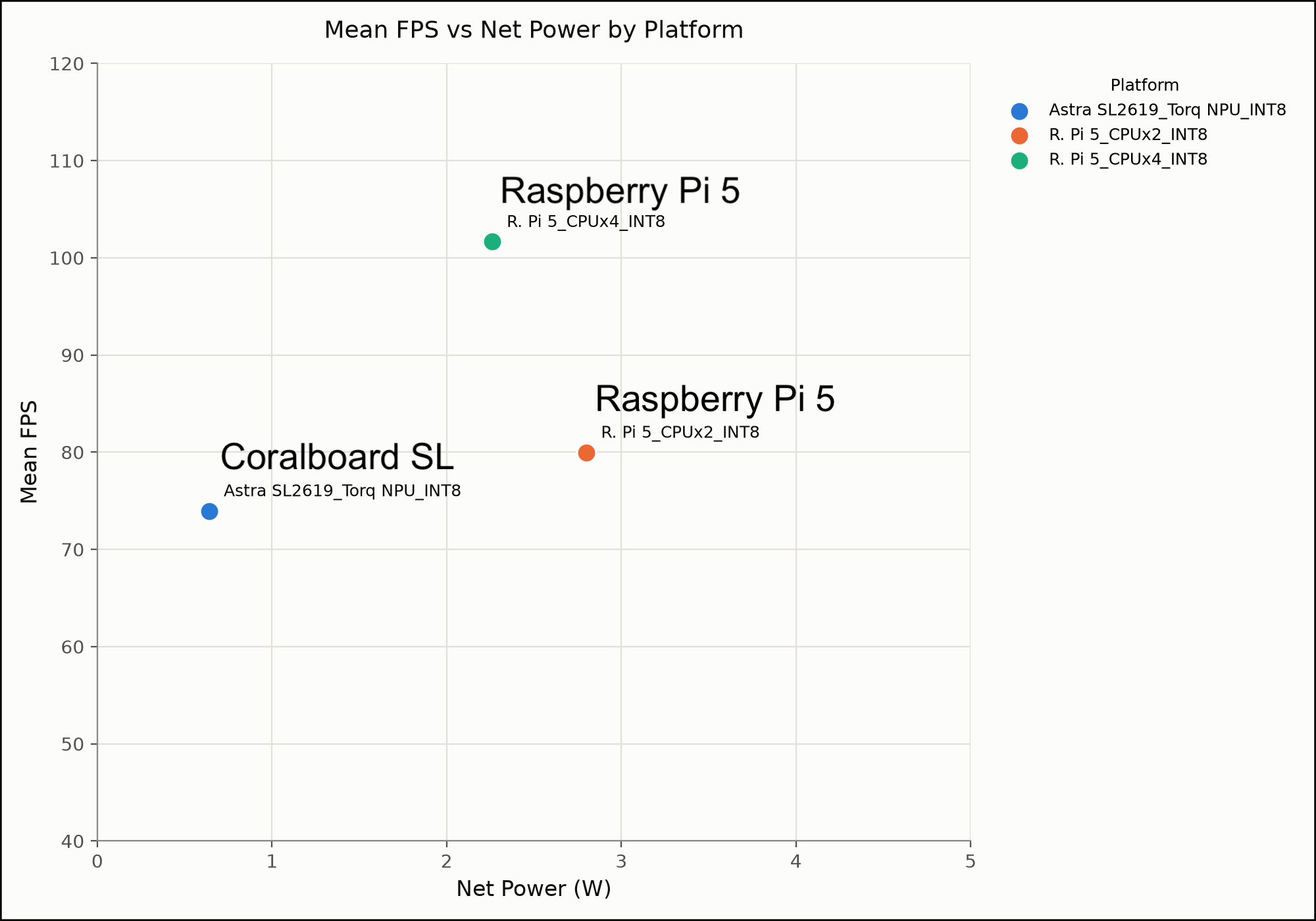
At first glance, it appears that Raspberry Pi 5 raw speed is higher (102 FPS vs 74 FPS). However notice how much power is required to achieve that performance. For applications where energy-efficiency is important, consider how much performance you get per unit of energy.
- Inferences Per Joule
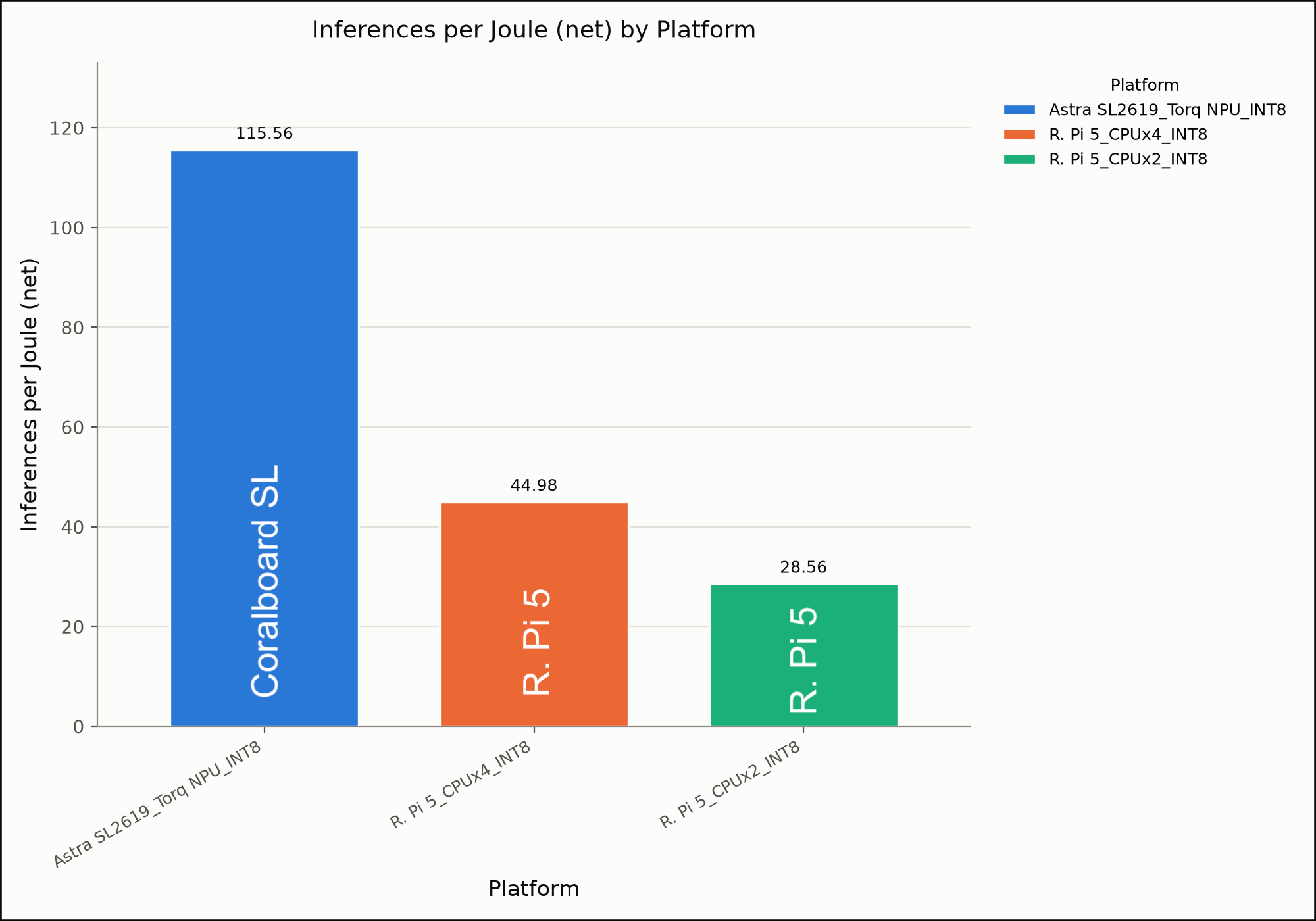
Now it is clear that the Coralboard SL with Astra SL2619 including the Torq NPU excels in energy efficiency, with over 2.6x more work done per unit of energy. All this, while still achieving 74+ frames per second (FPS). See note below about FPS.
The Coralboard SL delivered 2.6x the inferences per joule versus the Raspberry Pi 5, while still sustaining 74 FPS.
Large Language Model (LLM)
Next we tested Gemma3 270M LLM. This is an open-weight model from Google that is designed primarily for on-device deployment and narrow focused tasks. It can be used for many language-related tasks and even simple smart assistants.
Again, we tested model inference on the Coralboard SL 2GB (Astra SL2619) using the NPU. We also tested the Raspberry Pi 5 2GB using CPU x 2 and CPU x 4 configurations. Again, the whole board power was measured. To focus on the AI model execution efficiency, the baseline power was subtracted out.
Additionally, we tested several different variants of the model with different levels of quantization including int4, int8, bf16, and fp32. As expected, the higher the model quantization, the more energy and memory efficient it was. However, the relative performance between the Coralboard SL and the Raspberry Pi 5 remained very similar. The following comparison focuses on the most aggressive quantized model - int4.
- Performance vs Power
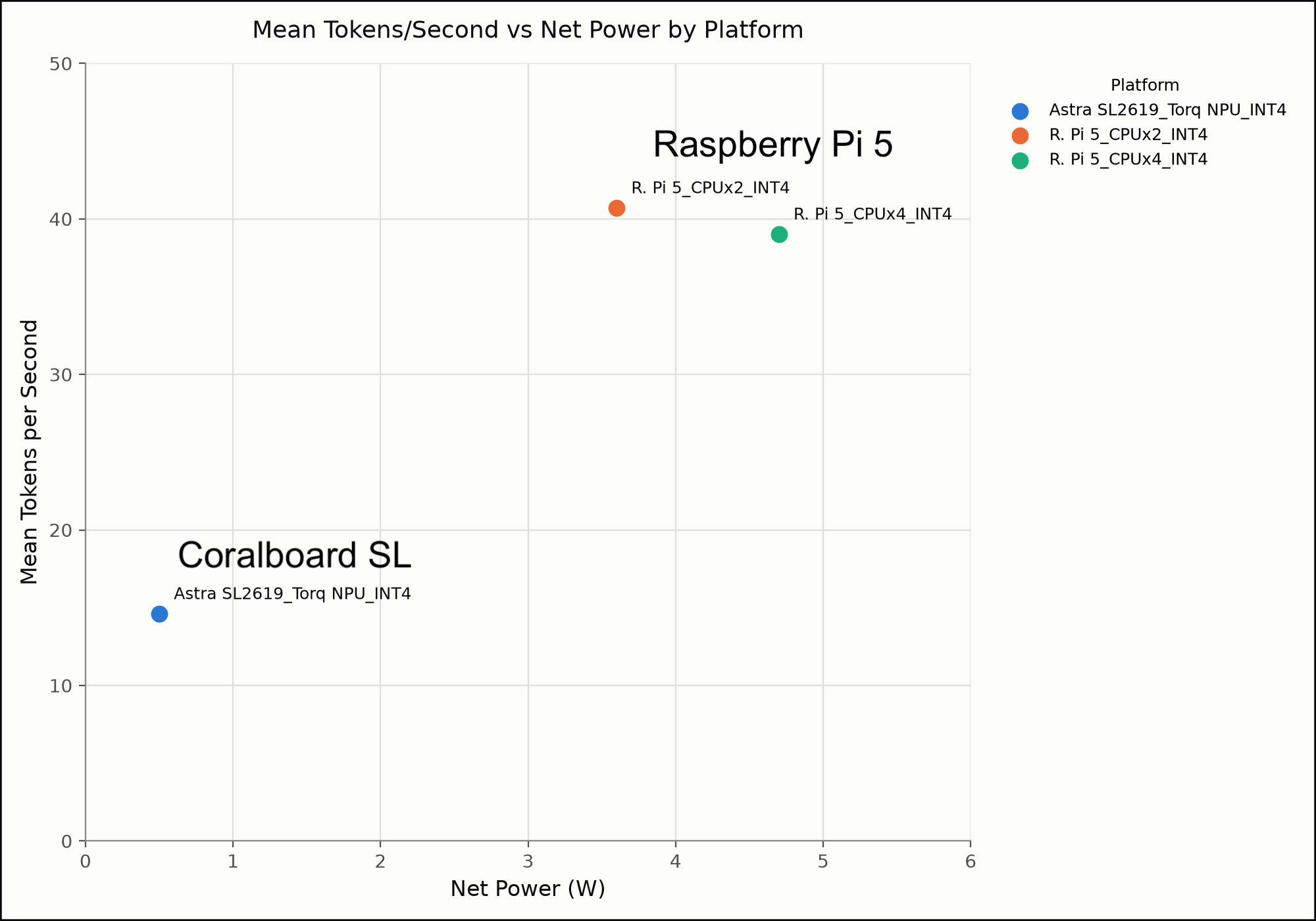
Again, the Raspberry Pi 5 speed is higher (41 tok/sec vs 15 tok/sec). However, again power savings of the Coralboard SL is massive. Let's consider the performance per unit of energy.
- Inferences Per Joule
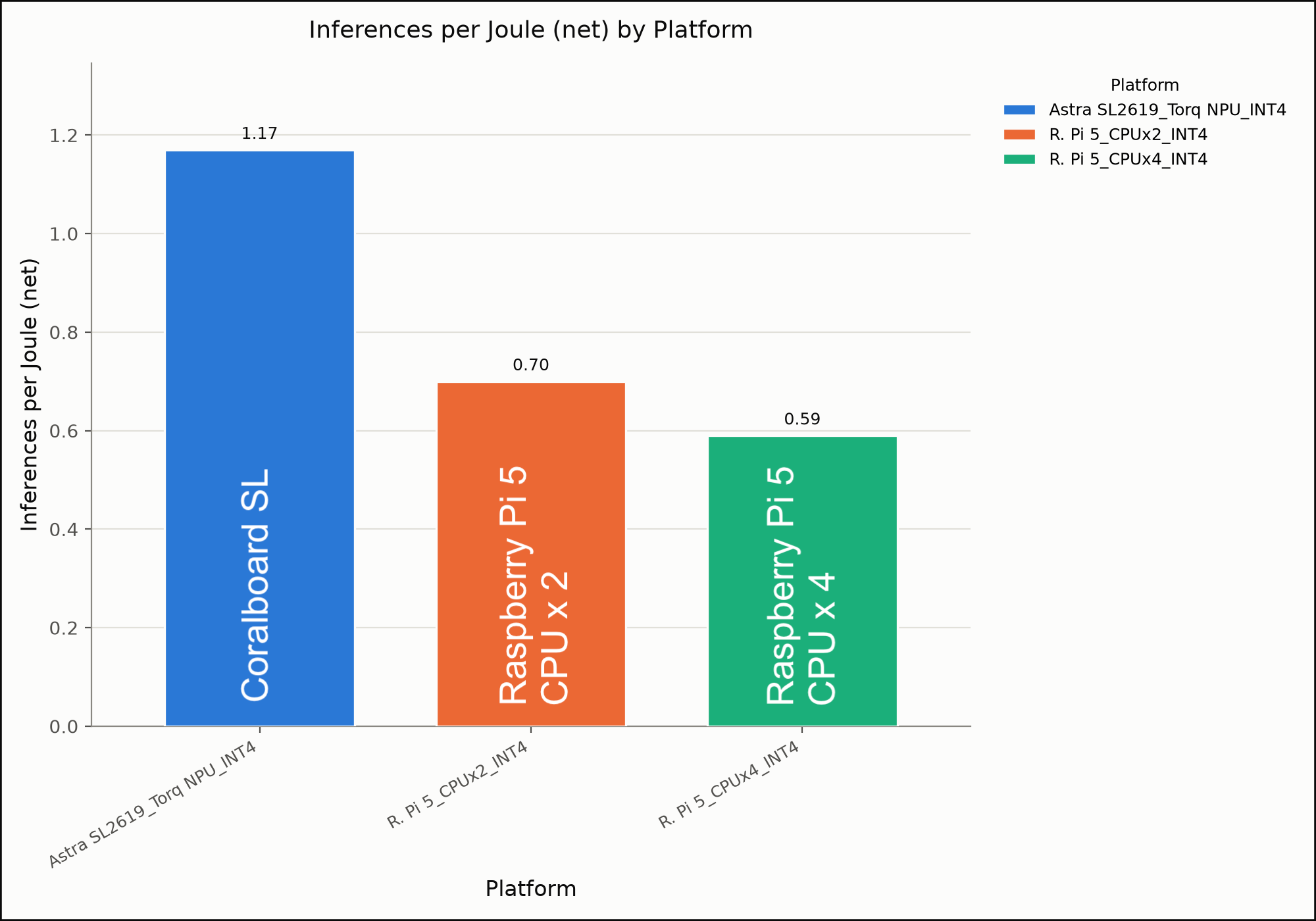
The Coralboard SL with Astra SL2619 and the Torq NPU is again the most energy efficient, getting 1.17 inferences done per joule (watt-second) in the testing versus 0.7 inferences per joule for the best Raspberry Pi 5 configuration.
- Memory Utilization
What about memory usage? We checked the peak memory required on each platform configuration tested.
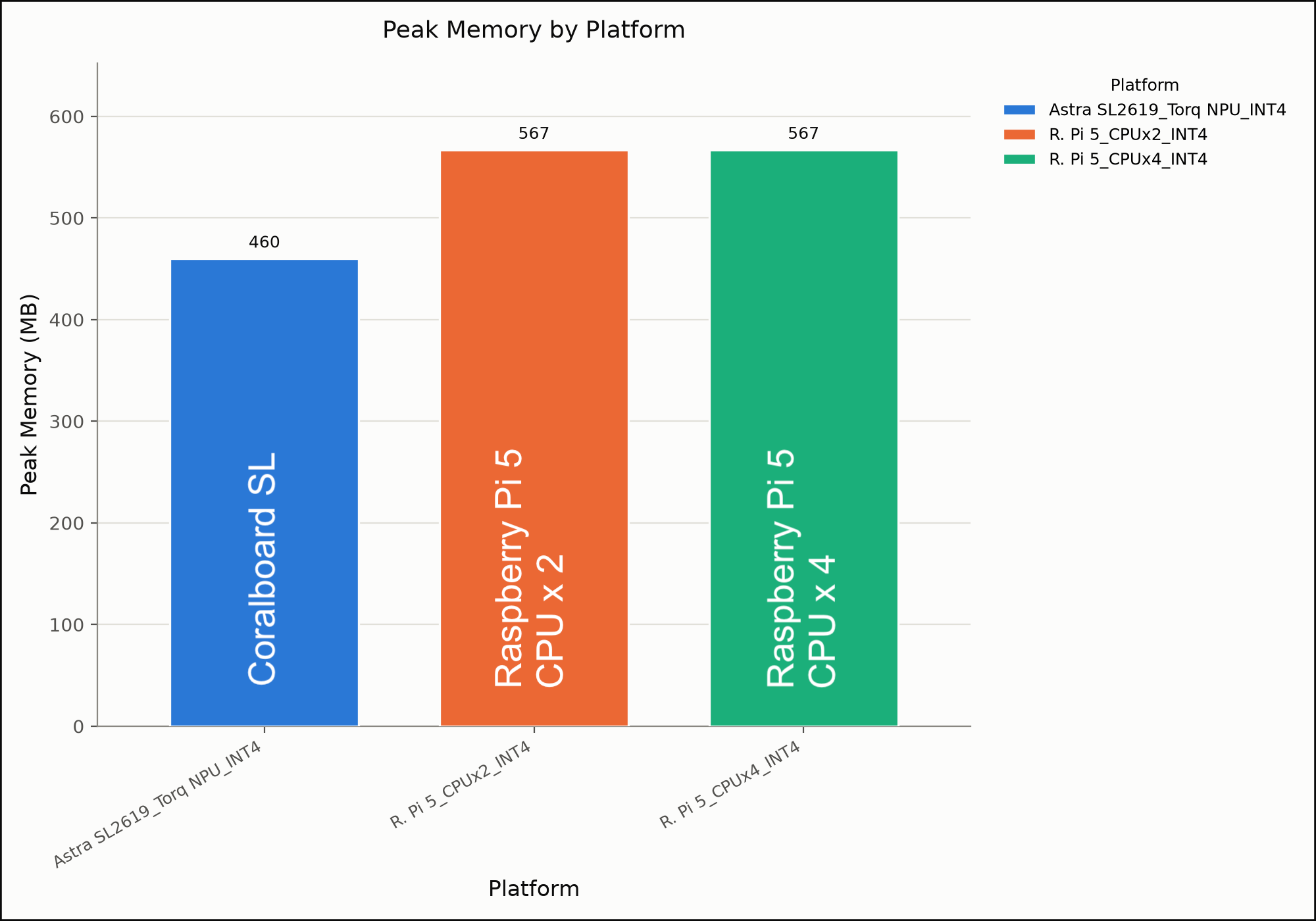
Due to the model optimizations that come with the Torq compiler and runtime, models running on Astra SL2619 required the least memory in the testing.
- The Coralboard SL achieved 1.7x more work done per unit of energy versus the Raspberry Pi 5, while still achieving ~15 tokens / second, which is faster than human speech (~3 tok/sec) and comfortable reading (~5 tok/sec).
- Also, the Coralboard was ~19% more memory-efficient.
See benchmarking details below for more information.
Modularity & Expandability
Both boards have a path from prototype to production. The Coralboard SL design is intended to scale to the Grinn AstraSOM-261x System on Module for production designs (see below). The Raspberry Pi 5's production path is the Raspberry Pi Compute Module 5 (CM5), which carries the same BCM2712 SoC in a SO-DIMM-style module for custom carrier boards.
Going to Production
The Synaptics Coralboard SL 2GB design is based on the Grinn AstraSOM-261x, a production-ready System on Module (SoM). Utilizing the SoM in a production system dramatically reduces design complexity. For more information, check out the Grinn AstraSOM-261x Product Page. The Raspberry Pi ecosystem's equivalent production path is the Raspberry Pi Compute Module 5, designed for integration into custom carrier boards at scale.
Summary
The Raspberry Pi 5 and Coralboard SL aren't really competing for the same spot on your desk. The Raspberry Pi 5 is a good choice when you want general-purpose compute, broad HAT and software ecosystem, and flexible memory/storage options — especially for projects where power budget isn't the primary constraint. The Coralboard SL is purpose-built for the opposite end of that spectrum: fitting real AI workloads — vision, audio, and even transformer-based LLMs — into a low-power, often battery-powered footprint, with an on-chip NPU and a dual-brain architecture that can keep watching for wake events at a fraction of the Pi's idle draw.
Want to Learn More?
- Buy a Coralbard SL
- Check out Coralboard SL Getting started guide.
- Read more about the Astra SL2610-Series.
- Learn more about the Coralboard Series at Google's official developer site.
- Find the latest SL2610 Example Applications on Github
- Learn how to start building edge AI applications with Synaptics Astra at the Synaptics Developer Zone
Additional Information
Notes
-
AI HAT - Raspberry Pi 5 is compatible with add-on neural network accelerators (AI HAT+ and AI HAT+2). These add AI processing performance, however they come at a considerable additional cost as well as increased power consumption. AI HATs were intentionally not tested keep costs and energy-consumption comparable.
-
DRAM Memory - Additional memory increases performance, however this again increases the cost (especially due to recent skyrocketing memory prices). More memory also means power consumption. Also to keep things comparable and focused on energy efficiency, we tested both platforms in their 2 GB forms.
-
FPS: FPS here measures inference throughput only — based on model compute time per frame — not end-to-end camera capture rate, which the camera itself caps at its frame rate (~30). So, how much FPS do you really need? Faster means you can do other things while you wait for the next frame to come in. If you really need to do that depends on the application.
Benchmarking Details
Power Measurement Setup
- Power was measured on the input to the whole board using a USB Type-C power analyzer. Power numbers include the microprocessor, memory, and peripheral chips.
- Baseline power was subtracted from the measured power to get the net power required to do the inference.
- Energy was calculated based on the power times the time to complete the inference.
- Unused services were disabled to reduce power including display and networking.
Object Detection Testing
- A usb camera was used in the object detection test.
- The model was trained to recognize COCO objects.
- Runtimes
- LiteRT/TFLite for running on CPUs
- Torq/IREE for running on the NPU
LLM Testing
- A simple test was performed with 10 questions.
- The results were cross-checked across all tests. The model responses varied slightly but they were all factually accurate.
- Runtimes
- llama.cpp/GGUF for running on CPUs
- Torq/IREE for running on the NPU
Tested Software
- Astra SDK (Yocto Linux) v2.5
- Torq Compiler & Runtime v2.3
Tested Hardware
- Coralboard SL 2GB (Google I/O Edition)
- Raspberry Pi 5 2GB
Code
The code used for benchmarking was implemented in Python and published to this repository.
Google and Coralboard are trademarks of Google LLC. Raspberry Pi is a trademark of Raspberry Pi Ltd.