JIT 编译
简介
即时编译支持直接执行 TensorFlow Lite 模型。对于需要可移植性的应用程序(例如,必须能够在 Astra 嵌入式板或 Android 手机上运行),JIT 编译方法以性能为代价提供灵活性。
对于嵌入式应用程序,建议使用提前编译。
JIT 编译具有灵活性,但初始化时间可能需要几秒钟,且不支持额外的优化和安全媒体路径。
使用 NNAPI 进行在线推理
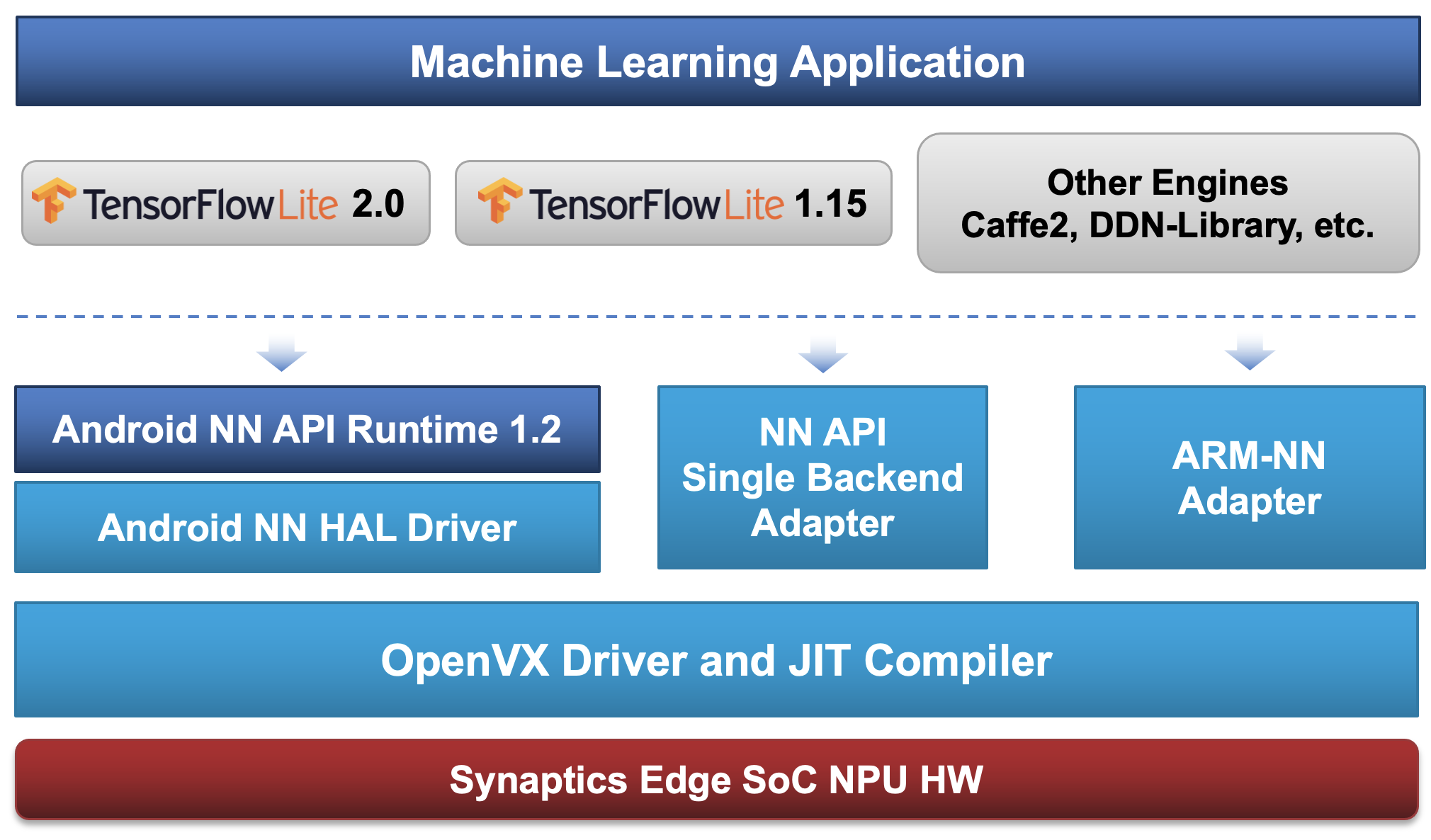
当通过 NNAPI 加载和执行模型时,它会自动转换为适合在 NPU 上执行的内部表示。这种转换不是在加载模型时进行,而是在执行第一次推理时进行。这是因为需要输入大小来执行转换,而对于某些模型,这些信息仅在推理时可用。如果在模型中指定了输入大小,则提供的输入必须匹配此大小。在任何情况下,都不可能更改第一次推理后的输入大小。
模型编译已经过高度优化,但即便如此,对于典型模型仍可能需要几毫秒到几秒钟的时间,因此建议在模型加载和准备后立即执行一次推理。用于加速模型编译的技术之一是缓存。编译模型时执行的一些计算结果被缓存在文件中,这样在下次编译相同模型时就不必再次执行。
在 Android 上,缓存文件默认保存在 /data/vendor/synap/nnhal.cache 中,最多可包含 10,000 个条目,这对于普通系统上的 NNAPI 使用来说是一个很好的设置。可以通过设置属性 vendor.SYNAP_CACHE_PATH 和 vendor.SYNAP_CACHE_CAPACITY 来更改缓存路径和大小。将容量设置为 0 将禁用缓存。加速模型编译的另一种可能性是使用 NNAPI 缓存,请参见NNAPI 编译缓存。
在 Yocto Linux 上,没有 NNAPI 缓存,但我们仍然在 /tmp/ 目录中有较小的每个进程缓存文件,名为 synap-cache.[PROGRAM-NAME](PROGRAM-NAME)。
使用 NNAPI 进行模型基准测试
可以使用标准的 Android NNAPI 工具 android_arm_benchmark_model(来自 TensorFlow 性能测量)对使用在线转换的模型执行进行基准测试。
一个针对 SyNAP 平台优化的自定义版本工具 benchmark_model 已经预装在开发板的 /vendor/bin 中。
对模型进行基准测试非常简单:
- 下载要测试的 tflite 模型,例如:
https://storage.googleapis.com/download.tensorflow.org/models/mobilenet_v1_2018_08_02/mobilenet_v1_0.25_224_quant.tgz - 将模型复制到开发板,例如复制到
/data/local/tmp目录:$ adb push mobilenet_v1_0.25_224_quant.tflite /data/local/tmp - 使用 NNAPI 在 NPU 上对模型执行进行基准测试(仅限 Android):
$ adb shell benchmark_model --graph=/data/local/tmp/mobilenet_v1_0.25_224_quant.tflite --use_nnapi=true --nnapi_accelerator_name=synap-npu

INFO: STARTING!
INFO: Tensorflow Version : 2.15.0
INFO: Log parameter values verbosely: [0]
INFO: Graph: [/data/local/tmp/mobilenet_v1_0.25_224_quant.tflite]
INFO: Use NNAPI: [1]
INFO: NNAPI accelerator name: [synap-npu]
INFO: NNAPI accelerators available: [synap-npu,nnapi-reference]
INFO: Loaded model /data/local/tmp/mobilenet_v1_0.25_224_quant.tflite
INFO: Initialized TensorFlow Lite runtime.
INFO: Created TensorFlow Lite delegate for NNAPI.
INFO: NNAPI delegate created.
WARNING: NNAPI SL driver did not implement SL_ANeuralNetworksDiagnostic_registerCallbacks!
VERBOSE: Replacing 31 out of 31 node(s) with delegate (TfLiteNnapiDelegate) node, yielding 1 partitions for the whole graph.
INFO: Explicitly applied NNAPI delegate, and the model graph will be completely executed by the delegate.
INFO: The input model file size (MB): 0.497264
INFO: Initialized session in 66.002ms.
INFO: Running benchmark for at least 1 iterations and at least 0.5 seconds but terminate if exceeding 150 seconds.
INFO: count=1 curr=637079

INFO: Running benchmark for at least 50 iterations and at least 1 seconds but terminate if exceeding 150 seconds.
INFO: count=520 first=2531 curr=2793 min=1171 max=9925 avg=1885.74 std=870

INFO: Inference timings in us: Init: 66002, First inference: 637079, Warmup (avg): 637079, Inference (avg): 1885.74
INFO: Note: as the benchmark tool itself affects memory footprint, the following is only APPROXIMATE to the actual memory footprint of the model at runtime. Take the information at your discretion.
INFO: Memory footprint delta from the start of the tool (MB): init=7.40234 overall=7.83203
NNAPI 是在 Android 上在 NPU 上执行在线推理的标准方式,但它不是最有效或最灵活的方式。在 Synaptics 平台上执行在线推理的建议方式是通过 timvx 委托。更多信息请参见使用 TimVx 委托进行模型基准测试部分。
如果由于任何原因模型中的某些层无法在 NPU 上执行,它们将自动回退到 CPU 执行。这种情况可能发生在特定层类型、选项或数据类型不被 NNAPI 或 SyNAP 支持的情况下。在这种情况下,网络图将被分区为多个委托内核,如 benchmark_model 的输出消息所示,例如:
$ adb shell benchmark_model ...
...
INFO: Initialized TensorFlow Lite runtime.
INFO: Created TensorFlow Lite delegate for NNAPI.
Explicitly applied NNAPI delegate, and the model graph will be partially executed by the delegate w/ 2 delegate kernels.
...
在 CPU 上执行部分网络将增加推理时间,有时会显著增加。为了更好地理解哪些是有问题的层以及时间花在哪里,可以使用选项 --enable_op_profiling=true 运行 benchmark_model。此选项生成在 CPU 上执行的层和执行它们所花费时间的详细报告。例如,在下面的执行中,网络包含一个回退到 CPU 执行的 RESIZE_NEAREST_NEIGHBOR 层:
$ adb shell benchmark_model ... --enable_op_profiling=true
...
Operator-wise Profiling Info for Regular Benchmark Runs:
============================== Run Order ==============================
            [node type]  [first]  [avg ms]      [%]    [cdf%]  [mem KB] [times called] [Name]
    TfLiteNnapiDelegate    3.826     4.011  62.037%   62.037%     0.000         1      []:64
RESIZE_NEAREST_NEIGHBOR    0.052     0.058   0.899%   62.936%     0.000         1      []:38
    TfLiteNnapiDelegate    2.244     2.396  37.064%  100.000%     0.000         1      []:65
通过在 sysfs 中查看 SyNAP inference_count 文件(参见系统文件系统推理计数器部分),也可以确认模型(或其部分)在 NPU 上的执行。
为了进行更深入的分析,可以通过在运行 benchmark_model 之前设置分析属性来获取详细的逐层推理时间:
$ adb shell setprop vendor.NNAPI_SYNAP_PROFILE 1
$ adb shell benchmark_model --graph=/data/local/tmp/mobilenet_v1_0.25_224_quant.tflite --use_nnapi=true --nnapi_accelerator_name=synap-npu
在 Android 上,分析信息将在 benchmark_model 运行时在 /sys/class/misc/synap/device/misc/synap/statistics/network_profile 中可用。在 Yocto Linux 上,相同的信息在 /sys/class/misc/synap/statistics/network_profile 中。
当启用 vendor.NNAPI_SYNAP_PROFILE 时,网络是逐步执行的,所以整体推理时间变得没有意义,应该忽略。
NNAPI 编译缓存
NNAPI 编译缓存通过缓存整个编译后的模型提供比默认 SyNAP 缓存更大的加速,但它需要应用程序的一些支持(参见Android 神经网络 API 编译缓存)并需要更多磁盘空间。
必须通过设置相应的 android 属性来启用 NNAPI 缓存支持:
$ adb shell setprop vendor.npu.cache.model 1
如官方 Android 文档所述,要使 NNAPI 编译缓存工作,用户必须提供一个目录来存储缓存的模型和每个模型的唯一密钥。唯一密钥通常通过计算整个模型的一些哈希值来确定。
可以使用 benchmark_model 测试这一点:
$ adb shell benchmark_model --graph=/data/local/tmp/mobilenet_v1_0.25_224_quant.tflite --use_nnapi=true --nnapi_accelerator_name=synap-npu --delegate_serialize_dir=/data/local/tmp/nnapiacache --delegate_serialize_token='`md5sum -b /data/local/tmp/mobilenet_v1_0.25_224_quant.tflite`'
在上述命令的第一次执行期间,NNAPI 将编译模型并将其添加到缓存中:
INFO: Initialized TensorFlow Lite runtime.
INFO: Created TensorFlow Lite delegate for NNAPI.
NNAPI delegate created.
ERROR: File /data/local/tmp/nnapiacache/a67461dd306cfd2ff0761cb21dedffe2_6183748634035649777.bin couldn't be opened for reading: No such file or directory
INFO: Replacing 31 node(s) with delegate (TfLiteNnapiDelegate) node, yielding 1 partitions.
...
Inference timings in us: Init: 34075, First inference: 1599062, Warmup (avg): 1.59906e+06, Inference (avg): 1380.86
在所有后续执行中,NNAPI 将直接从缓存加载编译后的模型,因此第一次推理会更快:
INFO: Initialized TensorFlow Lite runtime.
INFO: Created TensorFlow Lite delegate for NNAPI.
NNAPI delegate created.
INFO: Replacing 31 node(s) with delegate (TfLiteNnapiDelegate) node, yielding 1 partitions.
...
Inference timings in us: Init: 21330, First inference: 90853, Warmup (avg): 1734.13, Inference (avg): 1374.59
从 NNAPI 禁用 NPU 使用
可以通过将属性 vendor.NNAPI_SYNAP_DISABLE 设置为 1 来使 NPU 无法从 NNAPI 访问。在这种情况下,任何通过 NNAPI 运行模型的尝试都将始终回退到 CPU。
启用 NPU 的 NNAPI 执行:
$ adb shell setprop vendor.NNAPI_SYNAP_DISABLE 0
$ adb shell 'echo > /sys/class/misc/synap/device/misc/synap/statistics/inference_count'
$ adb shell benchmark_model --graph=/data/local/tmp/mobilenet_v1_0.25_224_quant.tflite --use_nnapi=true --nnapi_accelerator_name=synap-npu
Inference timings in us: Init: 24699, First inference: 1474732, Warmup (avg): 1.47473e+06, Inference (avg): 1674.03
$ adb shell cat /sys/class/misc/synap/device/misc/synap/statistics/inference_count
1004
禁用 NPU 的 NNAPI 执行:
$ adb shell setprop vendor.NNAPI_SYNAP_DISABLE 1
$ adb shell 'echo > /sys/class/misc/synap/device/misc/synap/statistics/inference_count'
$ adb shell benchmark_model --graph=/data/local/tmp/mobilenet_v1_0.25_224_quant.tflite --use_nnapi=true --nnapi_accelerator_name=synap-npu
Inference timings in us: Init: 7205, First inference: 15693, Warmup (avg): 14598.5, Inference (avg): 14640.3
$ adb shell cat /sys/class/misc/synap/device/misc/synap/statistics/inference_count
0
仍然可以使用 timvx tflite 委托在 NPU 上执行在线推理。
使用 TimVx 委托进行在线推理
NNAPI 不是在 NPU 上执行在线推理的唯一方式。可以通过使用标准的 TensorFlow Lite API 加载模型,然后使用 timvx tflite 委托来运行模型,而不使用 NNAPI。该委托经过优化可以直接调用 SyNAP API,因此通常可以提供比标准 NNAPI 更好的性能和更少的限制。
timvx 委托的另一个优势是它也可以在支持 NNAPI 的 Yocto Linux 平台上使用。这种方法的唯一限制是,作为标准 TensorFlow 运行时的委托,它不支持执行其他模型格式,如 ONNX。
timvx tflite 委托的内部工作流程与 NNAPI 类似:当加载 tflite 模型时,它会自动转换为适合在 NPU 上执行的内部表示。这种转换不是在加载模型时进行,而是在执行第一次推理时进行。
使用 TimVx 委托进行模型基准测试
Synaptics benchmark_model 工具为标准的 nnapi 委托和优化的 timvx 委托提供内置支持。
使用 timvx 委托对模型进行基准测试与使用 NNAPI 一样简单:
- 下载要测试的 tflite 模型,例如:
https://storage.googleapis.com/download.tensorflow.org/models/mobilenet_v1_2018_08_02/mobilenet_v1_0.25_224_quant.tgz - 将模型复制到开发板,例如复制到
/data/local/tmp目录:$ adb push mobilenet_v1_0.25_224_quant.tflite /data/local/tmp - 使用
timvx委托在 NPU 上对模型执行进行基准测试(Android 和 Linux 都支持):$ adb shell benchmark_model --graph=/data/local/tmp/mobilenet_v1_0.25_224_quant.tflite --external_delegate_path=libvx_delegate.so
INFO: STARTING!
INFO: Tensorflow Version : 2.15.0
INFO: Log parameter values verbosely: [0]
INFO: Graph: [/data/local/tmp/mobilenet_v1_0.25_224_quant.tflite]
INFO: External delegate path: [/vendor/lib64/libvx_delegate.so]
INFO: Loaded model /data/local/tmp/mobilenet_v1_0.25_224_quant.tflite
INFO: Initialized TensorFlow Lite runtime.
INFO: Vx delegate: allowed_cache_mode set to 0.
INFO: Vx delegate: device num set to 0.
INFO: Vx delegate: allowed_builtin_code set to 0.
INFO: Vx delegate: error_during_init set to 0.
INFO: Vx delegate: error_during_prepare set to 0.
INFO: Vx delegate: error_during_invoke set to 0.
INFO: EXTERNAL delegate created.
VERBOSE: Replacing 31 out of 31 node(s) with delegate (Vx Delegate) node, yielding 1 partitions for the whole graph.
INFO: Explicitly applied EXTERNAL delegate, and the model graph will be completely executed by the delegate.
INFO: The input model file size (MB): 0.497264
INFO: Initialized session in 25.573ms.
INFO: Running benchmark for at least 1 iterations and at least 0.5 seconds but terminate if exceeding 150 seconds.
type 54 str SoftmaxAxis0
INFO: count=277 first=201009 curr=863 min=811 max=201009 avg=1760.78 std=11997
INFO: Running benchmark for at least 50 iterations and at least 1 seconds but terminate if exceeding 150 seconds.
INFO: count=876 first=1272 curr=1730 min=810 max=6334 avg=1096.48 std=476
INFO: Inference timings in us: Init: 25573, First inference: 201009, Warmup (avg): 1760.78, Inference (avg): 1096.48
INFO: Note: as the benchmark tool itself affects memory footprint, the following is only APPROXIMATE to the actual memory footprint of the model at runtime. Take the information at your discretion.
INFO: Memory footprint delta from the start of the tool (MB): init=15.4688 overall=43.2852
将时间与使用 NNAPI 进行在线模型基准测试部分中的时间进行比较,我们可以注意到,即使对于这个简单的模型,timvx 委托提供的性能也比 NNAPI 更好(平均推理时间 1096 微秒 vs 1885 微秒)。