
From PyTorch to the Torq™ NPU: Converting AI Models for Efficient Deployment

This is a companion piece to the real-time speech recognition blog, which walked through exporting Moonshine V2 specifically. Here I want to zoom out and describe the general recipe that
torq-toolsuses to take any PyTorch model down to a.vmfbbinary that runs on the Torq T1 NPU. If you have your own model you'd like to bring to the board, this is the shape the work will take.
Introduction
PyTorch has become the standard framework for developing and training machine learning models, making it the starting point for most AI deployments. But while a PyTorch model is easy to train and evaluate, it can't run directly on an NPU. Like optimized C++ code, a neural network must be converted, optimized, and compiled into a format the target hardware can execute efficiently. This post walks through how to transform a PyTorch model into a compiled binary ready for high-performance inference on the Torq T1 NPU inside Astra SL2610.
Why run models on an NPU?
NPUs like the Torq NPU are purpose-built for runing AI models. They offer greater performance and efficiency and free up CPUs to run other tasks.
Overview
The figure shows the workflow of going from a PyTorch model to a compiled Virtual Machine FlatBuffer (.vmfb) binary that can run on the Torq NPU.
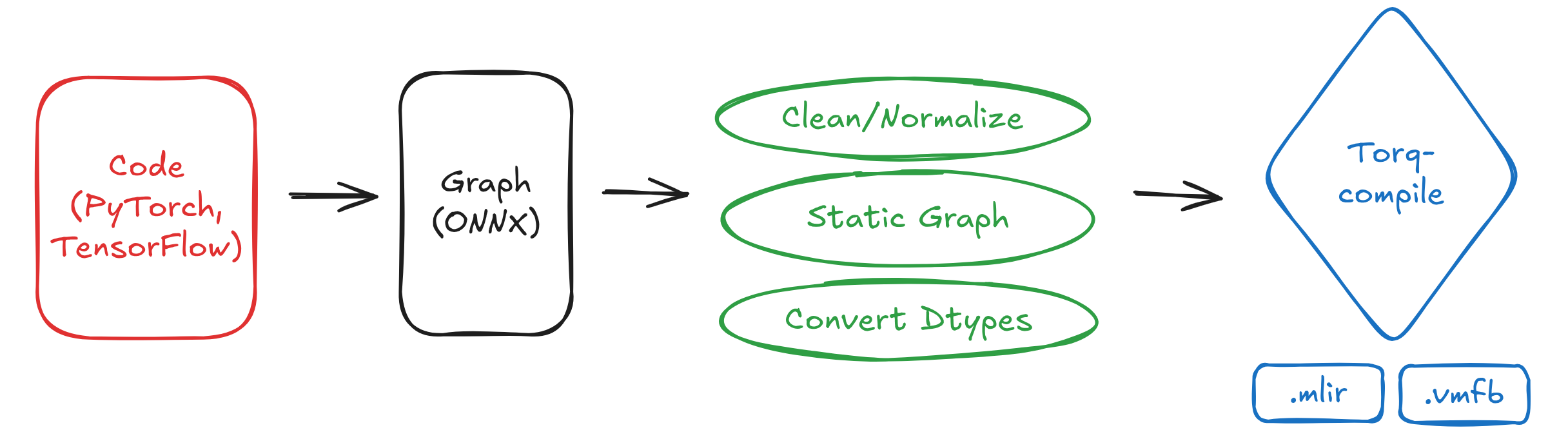
Model starting components
PyTorch and Hugging Face's Transformers are the go-to frameworks for training AI models because they remove most of the friction between an idea and a working model. PyTorch's dynamic, Pythonic design makes it easy to experiment and debug. Transformers builds on that ecosystem by giving developers instant access to thousands of pretrained models and simple APIs for fine-tuning them, avoiding the need to train from scratch.
ONNX (Open Neural Network Exchange) is a framework-agnostic format for representing a trained model as a static computation graph, and since most frameworks like PyTorch, TensorFlow, and others can all export to it, it's become a common starting point for compiler toolchains.
Optimizing a model for the NPU
The Torq NPU is designed to process static shapes, so any dynamic shapes in the model will need to be made static. This means that we will either export the model from PyTorch with fixed shapes or apply graph surgery on all the dynamic dimensions after export.
Quantizing model parameters — for example, converting 32-bit floats to 8-bit integers — also cuts memory footprint roughly 4x and speeds up inference, since lower-precision arithmetic runs faster on the NPU and moves less data through memory.
Why start from PyTorch at all?
You can sometimes find an ONNX export of a model already available on Hugging Face or elsewhere. While an ONNX file can be quickly converted and compiled for the Torq NPU, keep in mind that an ONNX graph is frozen. If it has any dynamic or unsupported operations, it will cause problems later. Any unsupported parts of the ONNX model have to be worked around rather than fixed at the source — something starting from PyTorch directly avoids.
Working from the PyTorch level, starting with just the model.safetensors weights and the modeling code, gives you room to make edits before the graph is ever frozen: rewriting a model's forward pass to be more export-friendly, splitting a monolithic model into components, or swapping in a custom attention implementation. Once a model is ONNX, those edits become much harder (you're doing graph surgery instead of just editing Python). However, even so, working with ONNX as a starting point can't always be avoided.
Introducing torq-tools
Synaptics provides a collection of open-source tools called torq-tools for exporting models to run on the Torq NPU. The tools help with the topics discussed in this post.
Check out the torq-tools README.md for information on how to install and use the tools
Exporter scripts
torq-tools contains model exporters for several popular models including Moonshine, Moonshine Streaming, SmolLM2, Gemma-3, and LFM2.5. This list will continue to grow over time.
Every model exporter under src/torq/models/<model>/export.py are a concrete instance of the recipe covered in this post, implemented against a shared base class: OnnxModelExporterBase in src/torq/model_export/onnx.py.
The exporter journey
The model exporter journey flows usually looks like this:
PyTorch weights ──► ONNX (raw) ──► ONNX (static, edited) ──► ONNX (bf16/quantized) ──► MLIR ──► .vmfb
Below is an overview of each stage of the journey.
Step 1: Get an ONNX graph out of PyTorch
There are two common paths, and different exporters in the repo use both:
torch.onnx.export(..., dynamo=True)— export directly from the model'snn.Module. This is the route to take when you need to hand-modify the model beforehand (e.g. Moonshine's decomposition intofrontend/encoder/adapter/cross_kv/decoder_kvcomponents).optimum-cli export onnx— for models Hugging Face'soptimumalready knows how to trace (SmolLM2, Gemma-3, LFM2.5 all use this viatorq.model_export.hf.optimum_export_onnx). This is less code, but you give up fine control over the graph shape at export time — any changes have to happen afterward via graph surgery.
# src/torq/model_export/hf.py
def optimum_export_onnx(onnx_dir, hf_repo, dtype, models, *, opset=22, opt_level="O1"):
    cmd = [
        sys.executable, "-m", "optimum.commands.optimum_cli", "export", "onnx",
        str(onnx_dir), "--model", hf_repo, "--dtype", dtype, "--opset", str(opset),
    ]
    ...
Either way, you end up with one or more .onnx files with dynamic shapes (batch, sequence length, KV-cache length are all symbolic dims) — that's the input to everything that follows.
Step 2: Clean and normalize the graph
Before touching the graph, every exporter runs it through onnx_graphsurgeon to strip dead weight and put it in a canonical form:
graph = gs.import_onnx(model)
graph.name = "main"
graph.cleanup(
    remove_unused_graph_inputs=True, remove_unused_node_outputs=True
).toposort()
model = gs.export_onnx(graph)
Names also matter here: MLIR identifiers don't accept every character ONNX allows, so OnnxModelExporterBase.sanitize_onnx_names rewrites tensor/initializer names to strip anything outside [a-zA-Z0-9_./] before the model is ever saved. Skipping this step is a common way to get a cryptic MLIR parse failure much later in the pipeline.
Step 3: Make the graph static
This is the step that takes the most custom work per model, and it exists because the Torq NPU expects fixed-length I/O and operations — no symbolic/dynamic shapes, no dynamic control flow. Every exporter implements an abstract make_static() method that:
- Fixes I/O shapes — batch size, sequence length, audio chunk length, KV-cache length, all become concrete integers baked into the graph.
- Replaces dynamic KV-cache growth with a fixed-size buffer. Autoregressive decoders normally grow the KV cache by one token per step; a static graph instead pre-allocates the full cache and writes into it at a computed offset.
- Adds an explicit causal/attention mask sized to the fixed length, since the graph can no longer infer masking from the current dynamic sequence length.
- Converts dynamic index math into static index math — patterns like
Range(start, start + 1, 1)(used to compute "the next write position") get rewritten into forms that don't require a dynamic range at trace time.
In torq-tools these are all reusable graph-edit passes (ReplaceDynamicKVCache, MaskFutureAttentionScores, AddCurrLenInput, ConvertToStaticIndex, in src/torq/graph_edit/edits/transformer.py), composed per-model:
# src/torq/models/smollm2/export.py (abbreviated)
(
    editor
    .replace_dynamic_kv_cache(cur_len, self._max_gen_tokens)
    .mask_future_attn_scores(cur_len, self._max_gen_tokens)
    .add_curr_len_input(cur_len)
    .convert_to_static_index()
)
After this step, export_onnx() explicitly checks that no dynamic dimensions remain:
dynamic_shapes = check_dynamic_shapes(onnx.load(self._export_paths[comp]))
if dynamic_shapes:
    raise ValueError(f"Model '{comp}' still has dynamic shapes: {json.dumps(dynamic_shapes)}")
Step 4: Graph edits for compiler & hardware compatibility
Even once a graph is fully static, it can still contain ops the Torq compiler doesn't (yet) support, or shapes/patterns that are needlessly expensive on the NPU. src/torq/graph_edit/edits/ is organized by concern:
| Module | Handles |
|---|---|
arithmetic.py | Decomposing LayerNormalization, folding scalar MatMul into Mul, removing redundant casts/IsNaN checks, replacing constant Div with Mul |
conv.py | Decomposing strided 1D convolutions, widening strided depthwise convs |
shape.py | Eliminating no-op Transpose/Expand, collapsing Reshape chains, broadcasting op inputs |
transformer.py | Static KV-cache / attention-mask machinery (see Step 3), collapsing GQA broadcast, retargeting cross-attention key layout |
rnn.py | Decomposing bidirectional RNNs into forward/backward halves |
padding.py | Absorbing padding into neighboring ops, rewriting negative pads, replacing Pad with Concat |
custom_ops.py | Replacing fused ops like GroupQueryAttention / SimplifiedLayerNorm with primitive-op equivalents |
artifacts.py | Extracting constant lookup tables (e.g. token embeddings) out of the graph into external .npy files, trimming/splitting the LM head |
This is also where you decompose ops the current compiler version doesn't support: in Moonshine's case, asinh had to be approximated with a fitted polynomial, and some LayerNorms needed decomposing due to an MLIR lowering issue. Be conservative here — over-decomposing can hurt either accuracy or latency, so only decompose what's actually unsupported or measurably faster in primitive form.
Each exporter applies its own subset of these passes in apply_post_static_patches(), called once per exported component.
Step 5: Validate before moving on
Every exporter implements validate_onnx(), which runs the static ONNX model side-by-side against the original dynamic model over a handful of prompts/inputs and diffs the outputs:
output = runner.run(input)          # static model
val_output = val_runner.run(input)  # original dynamic model
if output[:min_len] != val_output[:min_len]:
    result = "Warning: Validation failed, mismatched outputs..."
It's worth doing this before dtype conversion or quantization, so that if something breaks later, you already know the fp32 static graph itself was correct.
Step 6: Precision conversion and quantization
Two independent, optional tools operate on the static ONNX model at this point:
Dtype conversion (torq.tools.convert_dtype) downcasts fp32 → bf16 (which has native hardware acceleration in the Torq runtime) and int64 → int32/int16/int8 where legal:
torq-convert-dtype onnx -d bf16 -i model_fp32.onnx -o model_bf16.onnx
torq-convert-dtype onnx -d int32 -i model_bf16.onnx -o model_bf16_int32.onnx
Weight quantization (torq.tools.quantization.weight_quantization) goes further, quantizing MatMul weights to int8 or int4. For LLM-style decoders, a analyze step runs a KL-divergence sensitivity analysis per layer against calibration prompts and buckets each layer into a bit-width automatically:
torq-quantize-model analyze -i model_fp32.onnx -o sensitivity.json \
    --config-output quant_config.json --embeddings token_embeddings.npy --bits 4 8

torq-quantize-model quantize -i model_fp32.onnx -o model_mixed_bf16.onnx \
    --config quant_config.json --dequantize-weights
--dequantize-weights bakes the quantization error into a plain bf16 model (ready straight for compilation); without it you get DequantizeLinear nodes instead, useful if you want to inspect or share the quantized weights before committing to a final format.
Step 7: ONNX → MLIR → VMFB
This is the one stage that's identical for every model, handled by src/torq/utils/compile.py. It's a two-hop lowering:
iree-import-onnx(or the equivalent Python API,iree.compiler.tools.import_onnx) turns the ONNX graph into IREE-flavored MLIR.torq-compilelowers that MLIR down to a.vmfbbinary targeted at thetorqbackend.
def export_torq(input_model, output_dir, ...):
    ...
    export_onnx_to_mlir(input_model, mlir_model, opset=opset)
    compile_mlir_for_vm(mlir_model, vmfb_model, compiler_args=compiler_args, ...)
Both steps are exposed as a single CLI too, if you already have a static ONNX file sitting around and just want binaries:
torq-compile model_bf16.onnx -o model.vmfb
By default this cross-compiles for the board's aarch64 target; pass --local-compile to instead compile+run against your host machine for quick iteration (useful when you don't have a board handy, or want to sanity-check compilation errors faster).
Putting it all together
For models with a registered exporter, all seven steps above run as one command:
torq-export-model <model_name> [model-specific args] --convert-dtypes
e.g. for Gemma-3:
torq-export-model gemma3 --model-size 270m --instruct-model --convert-dtypes
The exporter walks through all the steps: download from HF → export ONNX → make static → apply graph edits → validate → convert to bf16 → compile to .vmfb, leaving you with a directory structure like:
models/<hf_repo>/export/onnx/float/static/      # static fp32 ONNX + validation
models/<hf_repo>/export/onnx/converted/static/  # bf16/int32-converted ONNX
models/<hf_repo>/export/torq/converted/static/  # .mlir + .vmfb
Writing your own exporter
If your model doesn't fit one of the existing recipes, you can write your own exporter by subclassing OnnxModelExporterBase. The interface is small — just implement:
| Method | Responsibility |
|---|---|
_setup_dirs() | Where source/export/converted/torq artifacts live |
_load_onnx() | Get from PyTorch/HF to a raw ONNX ModelProto per component |
make_static() | Fix shapes, replace dynamic KV-cache/control-flow with static equivalents |
apply_post_static_patches() | Per-component graph edits (op decomposition, embedding extraction, etc.) |
validate_onnx() | Parity check vs. the original dynamic model |
Everything else — sanitizing names, dtype conversion, quantization, MLIR lowering, VMFB compilation — is shared infrastructure you get for free.
Summary
- Getting a model onto the Torq NPU starts from PyTorch, not a pre-made ONNX file, so you retain the ability to edit the model before the graph is frozen.
- The graph must become fully static: fixed shapes, fixed-size KV caches, explicit masks, static index math.
- Graph edits fix up whatever the compiler can't (yet) lower, organized by concern (arithmetic, conv, shape, transformer, rnn, padding, custom ops).
- Validate the static fp32 graph against the original before converting precision.
- Precision conversion (bf16) and quantization (int8/int4) are separate, optional, composable steps.
- The ONNX → MLIR → VMFB lowering itself is model-agnostic and shared by every exporter.