Datasheet
Google I/O Edition
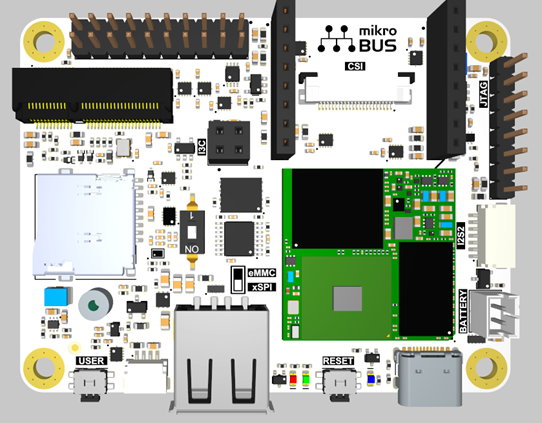
The Synaptics Coralboard™ Google I/O Edition is powered by the Synaptics Astra™ SL2619 Edge AI SoC that integrates the 1 TOPS Synaptics Torq™ inference engine featuring the industry's first implementation of Coral NPU. The board offers a rich set of hardware interfaces, including camera and display support using CSI/DSI and USB, microphone inputs, and Wi-Fi®/Bluetooth® connectivity through an M.2 expansion slot.
For help with any hardware, software, or other issues, please file a support request with Synaptics
Features
- Synaptics Astra® SL2619 SoC with Coral NPU
- 2GB DDR4
- 16 GB eMMC
- MicroSD card slot
- NOR flash memory
Additional features included with the Google I/O edition:
- Sensor add-on board
- Arducam OV5647 1080p Mini Camera Module
I/O
All I/Os are 3.3V except for the I2S2/I2S3 and I3C which are 1.8V.
- USB-C for power (5V only, no power negotiations) and data (device mode)
- USB-A host
- Battery (JST-PH 2.0 connector supporting 3.7V LiPo batteries) - no charging functionality
- CSI (Camera Serial Interface) MIPI 2-lane connector – 22-pin, 0.5mm pitch
- DSI (Digital Serial Interface) MIPI 4-lane display interface
- I2S2 audio IO - stereo digital audio I/O using the standard I²S (Inter-IC Sound) protocol
- I2S3 audio IO
- I3C connector
- Qwiic Connect system for I2C
- mikroBUS™ connector
- GPIO header (2 x 10 male pin header, 2.54mm pitch)
- M.2 E-key or E+A key (SDIO 3.0, UART/PCM, and GPIOs)
- Debug interface - UART for kernel messaging, etc. (see GPIO header below)
- Three LEDs - power and 2 user (1 default heartbeat)
- JTAG interface, THT holes for use with POGO-pin probe clip
- Two buttons (reset and user), 90-degree angled - user button is USB boot during reset
SoM
The Synaptics Coralboard Google I/O Edition features the SL2619 SoM (System-on-Module) by Grinn. For information about the SoM check out the Grinn AstraSOM-261x Product Page.
Block diagram
See Block Diagram for the connections between SL2619 SoM (System-on-Module) and the baseboard.
SL2619 datasheet
You can download the Synaptics SL261X processor datasheet directly from Synaptics.
Boot Switch
The Synaptics Coralboard Google I/O Edition can boot from either the on-board eMMC or a micro SD card.
| position | description |
|---|---|
| 1 / OFF | eMMC boot (default for Google I/O Edition) |
| 0 / ON | SD card boot |
Connectors
20-pin GPIO header
- 5V can either supply power or receive power from an external 5V source.
- I/Os must be 3.3V.
- Pins 6 (SM_URT0_TXD) and 8 (SM_URT0_RXD) are Linux CLI UART pins.
| Pin | Function | Pin | Function |
|---|---|---|---|
| 1 | 3V3 | 2 | 5V0 |
| 3 | SM_TW0_SDA | 4 | GND |
| 5 | SM_TW0_SCL | 6 | SM_URT0_TXD (output-only) |
| 7 | SM_PWM2 | 8 | SM_URT0_RXD (input-only) |
| 9 | SM_GPIO27 | 10 | SM_ADCI5 |
| 11 | GPIO45 | 12 | GPIO42 |
| 13 | SM_SPI1_SDO | 14 | SM_SPI1_SS3n |
| 15 | SM_SPI1_SDI | 16 | 1V8 |
| 17 | SM_SPI1_CLK | 18 | SM_URT3_RXD |
| 19 | GPIO56 | 20 | SM_URT3_TXD |
mikroBUS™ connector
- Follows the standard mikroBUS pin definition.
- 3.3V I/O.
- SM_ADCI3 is a dedicated analog input and cannot be used as GPIO.
- Address 0x60 is taken at SM_TW1.
- PMIC is connected to SM_TW1 and so these pins can be used only in I2C mode.
| J6 Pin | Function | J7 Pin | Function |
|---|---|---|---|
| 1 | SM_ADCI3 (analog input only) | 1 | SM_PWM3 |
| 2 | GPIO47 | 2 | GPIO44 |
| 3 | SPI5_SS2n | 3 | URT5_RXD |
| 4 | SPI5_SCLK | 4 | URT5_TXD |
| 5 | SPI5_SDI | 5 | SM_TW1_SCL |
| 6 | SPI5_SDO | 6 | SM_TW1_SDA |
| 7 | 3V3 | 7 | 5V |
| 8 | GND | 8 | GND |
Qwiic Connect for I2C (J8)
| Pin | Function |
|---|---|
| 1 | TW2_SCL |
| 2 | TW2_SDA |
| 3 | 3V3 |
| 4 | GND |
The Qwiic connector on the Google I/O Edition has a signal-ordering erratum: the pins are wired in reverse order. Standard Qwiic cables will not work with this connector. As a workaround, use a custom cable with the signal order reversed.
I3C connector (J9, 1.8V)
| Pin | Function |
|---|---|
| 1 | SM_I3C_MS_SDA |
| 2 | 1V8 |
| 3 | SM_I3C_MS_SCL |
| 4 | GND |
I2S2 connector (J4, 1.8V)
| Pin | Function |
|---|---|
| 1 | GND |
| 2 | I2S2_BCLK |
| 3 | I2S2_LRCK |
| 4 | I2S2_DO |
| 5 | I2S2_DI |
| 6 | I2S2_MCLK |
| 7 | 1V8 |
I2S3 connector (J14, 1.8V)
Not populated, signals shared with M.2 connector
| Pin | Function |
|---|---|
| 1 | GND |
| 2 | I2S3_BCLK |
| 3 | I2S3_LRCK |
| 4 | I2S3_DO |
| 5 | I2S3_DI |
| 6 | NC (no connect) |
| 7 | 1V8 |
Board software
The Synaptics Coralboard Google I/O Edition runs an embedded Linux distribution that you build using Yocto Project tooling. Synaptics provides the Yocto layers, firmware, drivers, and build scripts needed to build this Linux OS and root filesystem, packaged together as the Astra SDK. Complete documentation can be found in the Astra SDK documentation. Synaptics also provides pre-built images to quickly get started.
When it comes to developing AI/ML applications to run on the board, you will use the Synaptics MLIR-based Torq™ compiler and runtime tools. You can find more information about developing AI/ML applications on the Synaptics Astra SL2619 and Coral NPU at the Synaptics Developer Zone.
The Torq™ open-source toolchain supports popular machine learning frameworks and models, enabling a unified development experience from model optimization to deployment. When coupled with Gemma, Google's open-source model family for the edge, the combined hardware and software stack offers a powerful, open foundation for building private and efficient edge AI applications.
Technical notes
- SM_SPI1_SDO at the 20-pin connector (J5.13) should be in high-impedance state during CPU reset. This pin is BOOT_SRC1 and if driven externally it will affect boot mode of the device. Your actual result will depend on pin state and expected boot mode.
- GPIO26 should be low during reset, but it is pulled up by a level shifter. No negative impact has been observed for this pin being high in u-boot and Linux setting. If you do encounter problems, however, then GPIO26 (mikroBUS J7.4) should be tied to GND during reset.
- All TPs are located on the underside of the board.
- Shunt resistors and related TPs (for power measurements of various functions) are accessible by pogo-pins from an add-on board.
- All user connectors are located on one side of the board, for ease of enclosure integration.