AI Tool Calling
AI has many uses in embedded systems, but the output may contain inaccuracies, bias, or safety issues.
This guide assumes, you have taken a look at our Embeddings guide and AI Text Assistant guide.
Tool calling allows output from an AI model to call external functions or APIs. The typical use of tool-calling is to access a cloud API from a cloud-based LLM; but in embedded systems, we can also use it to interact with system state and peripherals. This has many uses include Voice UI (VUI) control of an embedded system.
Let's extend our Q&A-based AI assistant to call external tools when it sees special tokens. This lets your AI:
- See through a webcam (
{vision}) - Turn an LED on/off (
{light_on}and{light_off}) - Run shell commands (
{time})
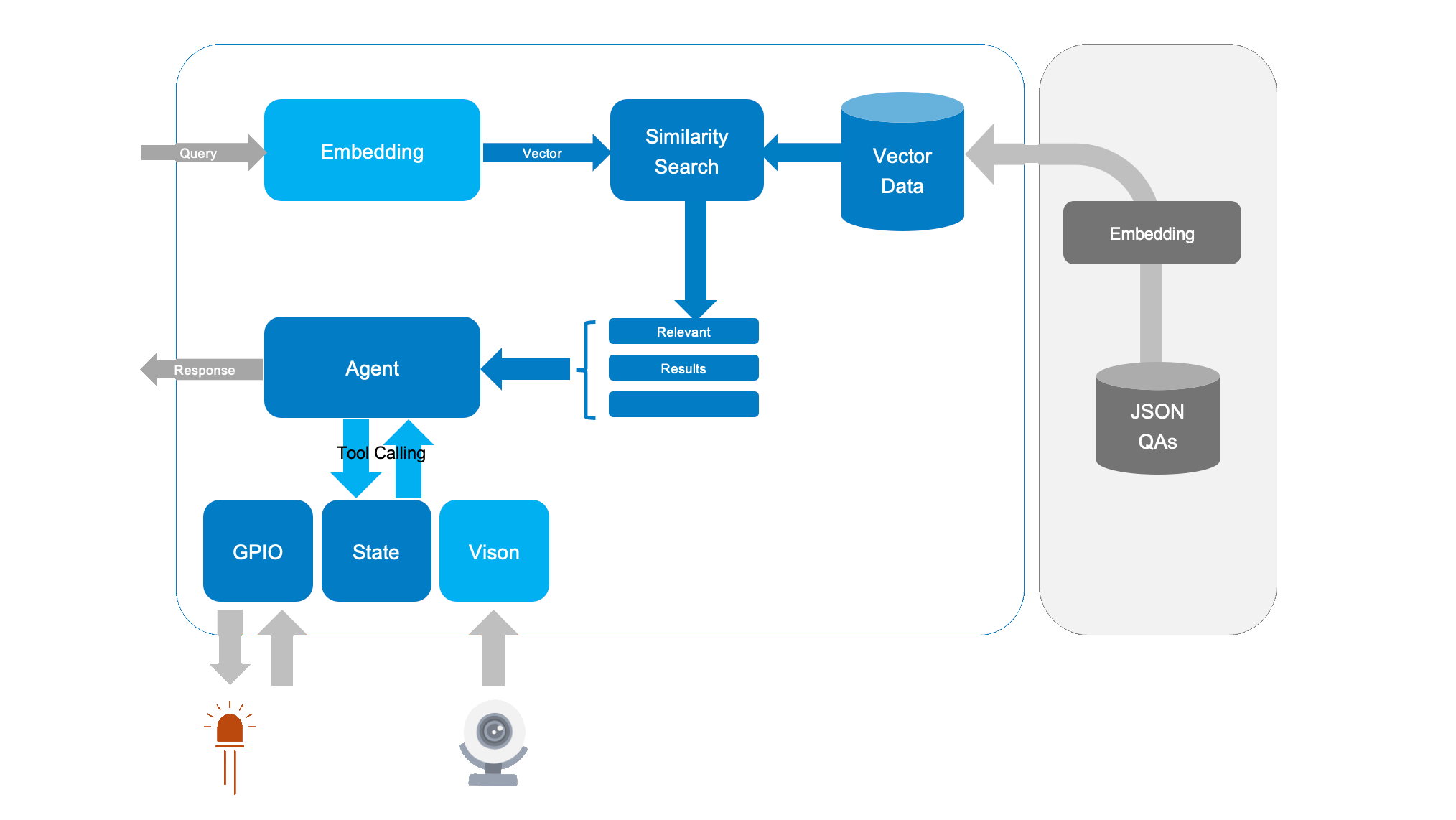
This quick guide is compatible with all SL16xx boards. While inference may vary, the steps remain the same across all Astra SL-Series processors.
Hardware Setup
- Synaptics Astra SL1680 Board
- USB Webcam (optional)
- Accessed by
vision.py, which uses NPU acceleration to run image classification on a frame - Returns a text description, for example: "I see a cat."
- Accessed by
- LED on a GPIO Pin (optional)
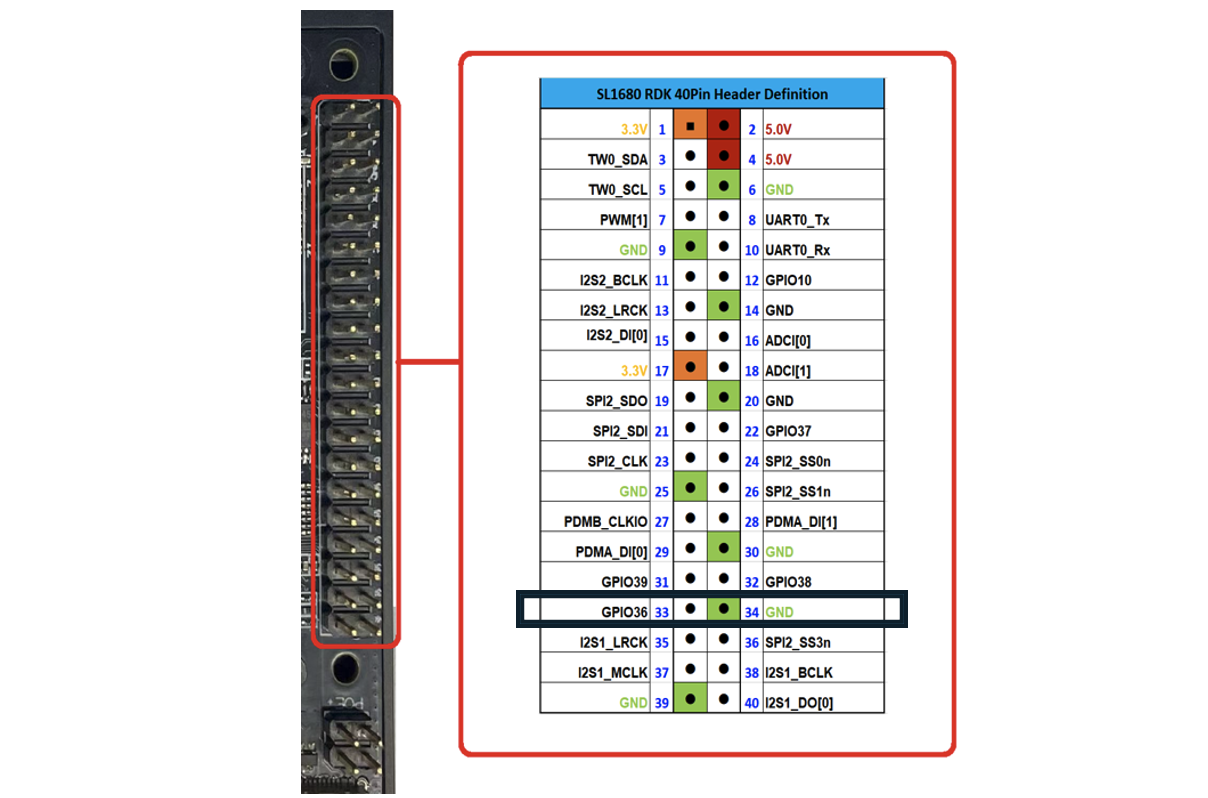
- Connected to GPIO[36] (physically pin 33 on the board) high (
{light_on}) or low ({light_off}) - Voice controlled with phrases similar to "light on" or "light off"
- Connected to GPIO[36] (physically pin 33 on the board) high (
Running The Demo
- Run the Assistant
python3 -m assistant.toolcall - Ask “What can you see?”
- The system identifies a match in
qa_pairs.json("I can see a {vision}) - It spots
{vision}, runspython3 path/to/vision.py, and replaces{vision}with the script output.
- The system identifies a match in
- Ask “Turn the light on”
- Matches the Q&A
"Turn the light on" ->"{light_on}"` - Your code executes the GPIO command to set the LED pin high.
- Matches the Q&A
- Ask “What time is it?”
- Returns
{date}=> callsdate=> outputs the system time.
- Returns
How It Works
- Embedding & Similarity: We embed each “Q + A” pair into a vector space. When a user asks a question, we compute the question embedding, compare it to stored embeddings, and find the highest cosine similarity.
- Response Construction: We retrieve the best matching “answer” from
qa_pairs.json. - Token Replacement: Before printing the final answer, we look for any placeholders such as
{light_on}. If present, we execute the associated command fromtools.jsonand replace the token with the command’s output.
Data Files
1. data/qa_pairs.json
Instead of only storing static text, we embed “tool tokens” in the answer field. For example:
[
    {
        "question": "What's the time?",
        "answer": "{time}"
    },
    {
        "question": "What can you see?",
        "answer": "I can see a {vision}"
    },
    {
        "question": "Turn the light on",
        "answer": "{light_on}"
    },
    {
        "question": "Turn the light off",
        "answer": "{light_off}"
    },
]
Here, "{vision}" stands for a call to run NPU accelerated image classification on the webcam image, and "{light_on}" calls the GPIO script that turns the LED on.
2. data/tools.json
This file maps each token to the command we want the system to run:
[
    {
        "token": "{time}",
        "command": "date"
    },
    {
        "token": "{vision}",
        "command": "python3 assistant/tools/vision.py"
    },
    {
        "token": "{light_on}",
        "command": "echo 'light on' & python assistant/tools/gpio.py 484 out 1"
    },
    {
        "token": "{light_off}",
        "command": "echo 'light off' & python assistant/tools/gpio.py 484 out 0"
    }
]
Feel free to customize paths and parameters to match your board’s setup.
Key Code Concepts
Below are the essential snippets illustrating how to call tools when a token appears in the chosen answer:
import json
import subprocess

def run_command(command):
    """Run a shell command and return its output as a string."""
    try:
        return subprocess.check_output(command, shell=True).decode().strip()
    except Exception as e:
        return f"[error: {e}]"

def replace_tool_tokens(answer, tools):
    """Replace placeholders in the answer with external command outputs."""
    for tool in tools:
        if tool["token"] in answer:
            # Run the corresponding command and inject the result
            result = run_command(tool["command"])
            answer = answer.replace(tool["token"], result)
    return answer
Inside your main assistant loop:
# Load Q&A pairs and precompute embeddings, etc. (not fully shown)
with open("qa_pairs.json") as f:
    qa_pairs = json.load(f)

with open("tools.json") as f:
    tools = json.load(f)

while True:
    query = input("Ask me anything (or 'exit'): ")
    if query.lower() == "exit":
        break

    # 1. Find best-match answer by cosine similarity (pseudocode)
    best_answer = find_best_match(query, qa_pairs)

    # 2. Replace any tool tokens with command outputs
    final_answer = replace_tool_tokens(best_answer, tools)

    print(f"Answer: {final_answer}\n")
The result is an assistant that can physically interact with the environment (turn lights on/off) and dynamically gather information (run vision analysis, print the current time), all by returning short tokens in its textual answers.
Customizing Tools and Commands
To add new capabilities, just add more tokens in qa_pairs.json and define how to handle them in tools.json. For instance, if you have an IR blaster or servo motor, create corresponding tokens (e.g. {raise servo}) and link them to your hardware script.
Conclusion
By pairing tool calling with embeddings-based question matching, we now have a practical AI assistant that can:
- Answer questions from a curated knowledge set,
- Dynamically run system commands or scripts to get answers from external systems,
- Integrate with real-world hardware like webcams and GPIO-driven LEDs.
This architecture is modular, letting you plug in new hardware tools, scripts, or APIs with minimal code changes.