AI Text Assistant
Let's build an AI helper that uses embedding from previous Embeddings guide and cosine similarity to pick the best answer from a Q&A file.
This quick guide is compatible with all SL16xx boards. While inference may vary, the steps remain the same across all Astra SL-Series processors.
Our example assistant.text performs the following:
- Loads Q&A pairs from a JSON file
data/qa_pairs.json - Creates text embeddings.
- Uses cosine similarity to rank answers.
- Runs a simple loop to take your query and give the most relevant reply available in the dataset.
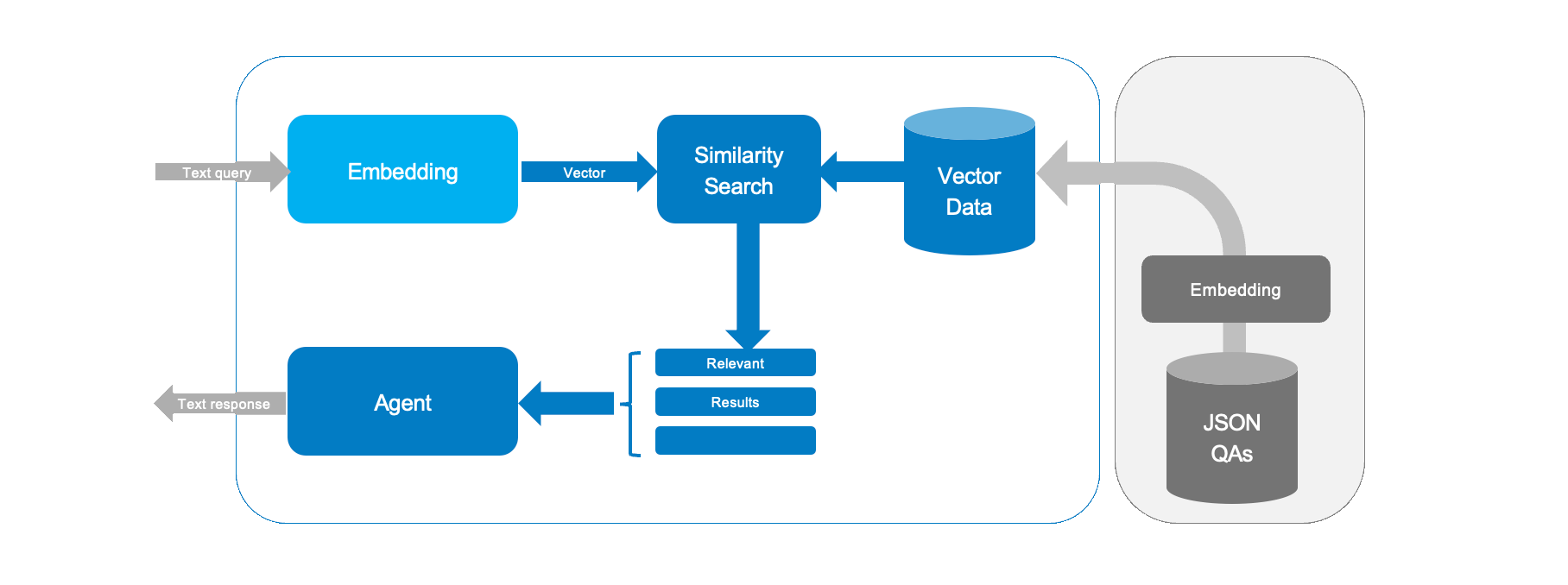
You can see the contents of our database with:
cat assistant/data/qa_pairs.json
This example is tiny, but the principle behind it can be extended to support far larger vector databases - and it used in LLM RAG implementations like Perplexity.ai. One source of data could be taking a device user manual and converting it into structure Q&A dataset in order to implement a simple support agent, for example.
Running the Demo
To run your assistant, type this in your terminal:
python3 -m assistant.text
You will see a prompt like this:
Assistant ready. Type your question (or 'exit' to quit):
>
Type your question, and the app will show the best match and a similarity score. For example:
Who are you?
Answer: I am an AI assistant running on Synaptics Astra SL 16 80
Similarity: 0.98
Try variations on question formats and test how good the similarity score is.
Deep Dive
Loading the Q&A Pairs
The code opens a JSON file and stores the pairs. Each pair is joined into one text. This text is then used to compute an embedding.
with open(qa_file, "r") as f:
    self.qa_pairs = json.load(f)

texts = [pair["question"] + " " + pair["answer"] for pair in self.qa_pairs]
This code reads the Q&A file and readies the text for the next step.
Generating Embeddings
The code loops over each text and computes its embedding. A progress bar shows how far the work has come.
embeddings = []
for text in tqdm(texts, desc="Computing embeddings"):
    embeddings.append(self.embeddings.generate(text))
return np.array(embeddings)
Each text is turned into a number array that helps with later comparisons.
Cosine Similarity for Search
This is the key function. It creates an embedding for your query and compares it with stored embeddings using cosine similarity.
query_emb = self.embeddings.generate(query)
sims = cosine_similarity([query_emb], self.question_embeddings).flatten()
best_idx = np.argmax(sims)
Here’s what happens:
- The query is turned into an embedding.
- Cosine similarity scores are computed.
- The highest score tells us the best match.
Multi-lingual input
In this text assistant we are using a multi-lingual version of the sentence transformer sentence-transformers/paraphrase-multilingual-MiniLM-L12-v2! The model is trained to output similar embeddings for the same texts in different languages - you do not need to specify the input language.
Try entering questions in another language, and it should match to the appropriate answer in English:
Was sind die Vorteile von Edge AI?
Answer: Edge AI is more efficient, private, and works without internet.
Similarity: 0.892445476864138
Vielen dank
Answer: You're welcome
Similarity: 0.8158796475751413
You can translate the ./assistant/data/qa_pairs.json answers to create a text assistant in a different language.
Creating your own assistant
Customizing this kind of assistant is straightforward - just edit the JSON file with your own questions and answers. This will let you see how new data changes the replies.
-
Open the
./assistant/data/qa_pairs.jsonfile. -
Add or change the entries. For example:
[
    {
        "question": "What is your name?",
        "answer": "I am a friendly bot."
    },
    {
        "question": "How are you?",
        "answer": "I am good, thanks."
    },
    {
        "question": "Tell me a joke",
        "answer": "I do not know any jokes yet."
    }
] -
Save the file.
-
Run the demo again:
python3 -m assistant.text
Your assistant will now use your own Q&A pairs.
Conclusion
This guide shows you how to build a simple AI Text assistant using Python. We loaded data from a JSON file, computed text embeddings, and used cosine similarity to find the best answer to a query.
One limitation of our simple assistant is it can only provide static text answers to questions. One method to augment this is called tool calling, which allows external APIs or functions to be called by an AI agent. We will take a look at tool calling in the next guide.