GStreamer Inference
This tutorial covers how to run real-time inference on a video stream. It assumes you are familiar with setting up your Astra board. If not, please refer to the setup tutorial.
This tutorial supports Synaptics Astra™ Machina™ SL1680 and SL1640 boards with NPU optimizations.
SL1620 does not have this pre-installed YOLOv8s-640x384 model. You can create and run your model on the GPU using the same steps.
In this guide, you will use a YOLOv8 Object Detection model with a 640x384 input resolution. This is a pre-installed SyNAP .synap model located at /usr/share/synap/models/object_detection/coco/model/yolov8s-640x384/model.synap, so there's no need to convert your own model.
Prerequisites
- Astra Machina SL1680 / SL1640 with firmware v1.x.x or higher.
- A video source (video file, camera, or RTSP stream). This tutorial uses a camera, but the steps are the same for video files and RTSP streams.
Clone the Examples Repository
The video inference examples are available in the Astra GitHub Examples repository:
Clone the repository to your board and navigate to the gstreamer/gst-pipeline folder.
Running an Example
The example code are located in the /gstreamer/gst-pipeline/examples folder. There are specific examples for each input type and a more generic example (infer.py) that supports all input types. In this tutorial, you will use infer_camera.py to demonstrate real-time video inference on a camera input stream.
Before running an example, make sure to export the following environment variables:
export XDG_RUNTIME_DIR=/var/run/user/0
export WESTON_DISABLE_GBM_MODIFIERS=true
export WAYLAND_DISPLAY=wayland-1
export QT_QPA_PLATFORM=wayland
Once the environment is set up, launch the example by running this command on your board:
python3 -m examples.infer_camera
You will see an output similar to the following:
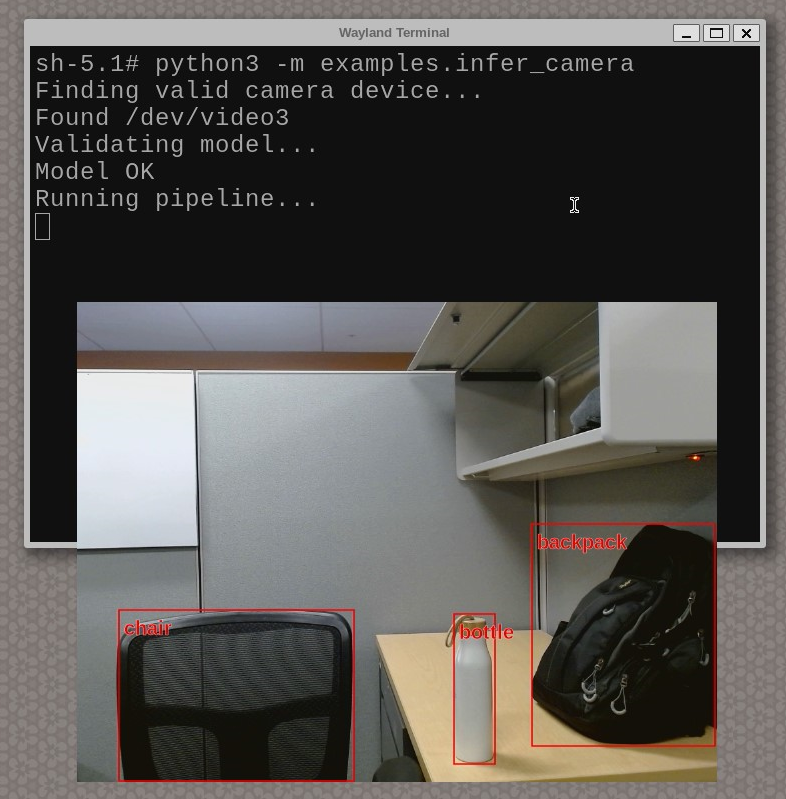
The script will automatically detect the connected camera and run inference with the pre-loaded model. Press Ctrl+C in the terminal to stop the script.
That's it! You have now successfully run real-time inference on a video stream.
To get a full list of possible parameters, do python3 -m examples.infer_camera --help.
Alternatively, the default for parameters such as input source and model can be modified directly in the example script for more permanent changes.
Avoid using --fullscreen in Wayland terminals, as it may obscure the terminal, making it difficult to stop the example (especially with camera/RTSP streams or long video inputs).
Explore more possibilities with the infer.py base script, which supports all input types and offers greater customization.
Addition resources
-
Examples gst-pipeline Repo: Check out the documentation on
video_inferenceto learn how these examples work internally and how to create your own. -
Application gstreamer plugins syna : Source code for Synaptics gstreamer based plugins. Here you can check out gst-ai.
Next: Python Quick Guides
All the next Quick Guides are Python-based, so before proceeding you need to set up the necessary libraries and packages. Ensure that you have followed all the steps in the Quick Start and have OOBE SDK Image installed on the Machina Board which comes with pip and python3 pre-installed.