Bring Your Own Model
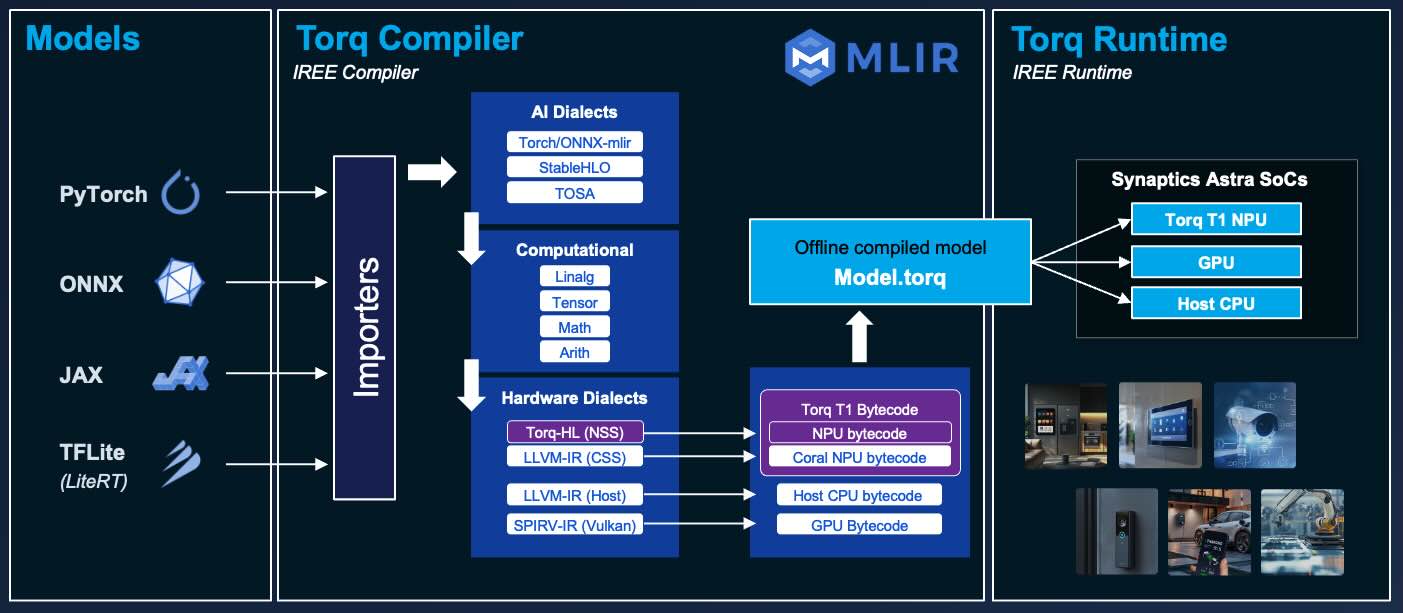
The Torq Edge AI Platform enables execution of diverse neural networks, efficiently utilizing NPU acceleration. The Torq tools and compiler allow you to convert a model from its original format to a representation that is optimized for the Torq NPU. In this tutorial, you will learn how to bring your own model, optimize it for the Synaptics Astra SL261x processors, and test model inference speeds.
Torq is based on the open-source IREE/MLIR compiler and runtime. You can write applications in C/C++ or Python and leverage Torq NPU acceleration. To learn more about Torq, visit the Torq Compiler User Manual
Check out the User Section for additional information on compiling and running models.
For advanced developers, check out the Developer Section to learn how to contribute to the industry-shifting effort to democratise edge AI tools.
Torq supports running models converted from multiple frameworks including TensorFlow, ONNX, PyTorch and JAX.
Models are converted into a static representation that is optimized to run on a Torq NPU. At runtime, the models are executed with the Torq / IREE runtime engine, which is a lightweight engine for executing pre-compiled models.
Compiling your model ahead of time into a optimized static representation is much more efficient than other approaches that translate models at runtime. Compiling gives you more control, better optimization, and more predictable performance.
Overview
Environment setup
Synaptics provides a development environment (called the Release Package) which includes the necessary Torq compiler tools and dependencies.
To ease deployment and setup of the package in an isolated environment, Synaptics offers a prebuilt Docker image on the GitHub Container Registry.
Sign into the GitHub Container Registry
docker login ghcr.io
You will need to have a GitHub account and a GitHub personal access token.
Download a model
In this tutorial, you will convert a TFLite (LiteRT) model file and compile it into the Torq bytecode file format.
Download the MobileNetV2_int8.tflite file from Hugging Face at Synaptics/MobileNetV2.
Run the Docker container
Create and run an ephemeral Docker container based on the v2.0.0 Torq development environment Docker image from the registry.
docker run --rm -it -v $(pwd):$(pwd) -w $(pwd) -u $(id -u):$(id -g) ghcr.io/synaptics-torq/torq-compiler/compiler:v2.0
Converting a model into a MLIR dialect
Before compling, the model needs to be expressed in a MLIR-supported dialect.
In this tutorial, we will focus on a commonly used dialect called Tensor Operator Set Architecture (TOSA).
MLIR files in TOSA dialect can be in text format (.tosa or .mlir) or binary format (.mlirbc). We will use text format.
With the Docker container running, execute this command.
tosa-converter-for-tflite MobileNetV2_int8.tflite --text -o MobileNetV2_int8.tosa
If successful, you will see something like the following.
[INFO] TOSA MLIR (text) written to: synaptics_MobileNetV2.tosa
As of Torq compiler version 2.0.0, the utility tosa-converter-for-tflite is recommended for converting TensorFlow lite files because it produces more standardized representations and runs cross-platform. Previous iterations of this tutorial utilzed the iree-import-tflite utility. For reference, the previous command is still usable.
iree-import-tflite MobileNetv2_int8.tflite -o MobileNetv2_int8.tosa
Compile the model into the Torq bytecode format
Compile the model with this command:
torq-compile MobileNetv2_int8.tosa -o MobileNetv2_int8.vmfb
If successful, you will see something like the following.
[TORQ] Lowering dispatch: main_dispatch_0_conv_2d_nhwc_hwcf_1x7x7x1280x1x1x320_i8xi8xi32
The Torq compiler has many options. To get a full list, type this command.
torq-compile -h
The output of the compiler will be a MobileNetv2_int8.vmfb file, which is a Virtual Machine FlatBuffer (VMFB) file storing the Torq bytecode.
Exit the Docker container
exit
Upload model to the Astra SL2610 board
You can now upload it to your SL2610-series development kit in a terminal using adb or ssh:
For example, using adb:
adb push MobileNetv2_int8.vmfb /home/root/
Test the model
Open a terminal on the Astra device. If you have an attached monitor, mouse, and keyboard, use that.
Or you can connect from your host machine using adb or ssh. We will use adb.
adb shell
In the command prompt for the Astra, run the model with dummy data.
cd /home/root
iree-run-module --device=torq --module=MobileNetv2_int8.vmfb --function=main --input="1x224x224x3xi8=1”
You will see the output starting with this, which indicates that the model ran correctly.
1x1000xi8=[-128 -128 -128 -128 -128 -128 -128 -128 -128 -128 …
You can also test this particular model using the image_classification example application in the sl2610-examples Python-based example applications repository.
Additionally, see other example applications for running models on Torq in the torq_examples repository.
New - Use the Torq Compiler Python Package! (Currently x86 only)
Starting with Torq compiler version 2.0.0, a Python package is available, which includes the compiler and tools. This eliminates the need for Docker.
As of v2.0.0, the package includes tools to convert the following models frameworks
- TensorFlow Lite
- ONNX
- TensorFlow SavedModel
Host requirements
- Python 3.12
- Currently only supported on x86 hosts running Linux (including WSL on Windows)
Steps
Open the latest release on the Torq compiler releases page.
In the Assets, locate and download the torq_compiler .whl file for (e.g. torq_compiler-2.0.0-cp312-cp312-manylinux_2_28_x86_64.whl)
Open a terminal on your host machine such as with WSL on Windows.
Create and activate a Python virtual environment.
python3 -m venv .venv
source .venv/bin/activate
Install the package, passing in onnx and tfile flags to enable conversion support for those frameworks.
pip install "torq_compiler-<version>-<platform>.whl[onnx,tflite]"
Convert the model using the included tosa-converter-for-tflite utility.
tosa-converter-for-tflite MobileNetv2_int8.tflite --text -o MobileNetv2_int8.tosa
Compile the model with this command:
torq-compile MobileNetv2_int8.tosa -o MobileNetv2_int8.vmfb
Congratulations
You've just imported a model from Hugging Face, optimized it for Torq NPU, and ran it on the Synaptics Astra SL2610-Series!
Check out the quick guide on image classification to learn more about how to run it.
Additional Information
If you are using macOS on Apple Silicon, you may encounter an invalid instruction error with the iree-import-tflite tool referenced in this tutorial.
Build a docker image with the linux/arm64 platform type. Follow these steps.
- Download the latest release package.
- Extract the files.
tar -xvzf release.tar.gz
cd release
- Build a docker image with the
linux/arm64platform type.
docker build --platform linux/arm64 -t synaptics-torq/torq-compiler/compiler-arm64:latest .
- Create and run a container for model conversion
docker run --rm --platform linux/arm64 -it -v $(pwd):$(pwd) -w $(pwd) -u $(id -u):$(id -g) synaptics-torq/torq-compiler/compiler-arm64
Use this for running the iree-import-tflite command only.