
Image Classification on SL2610-Series
Complete the Getting Started with SL2610 guide first. It covers setting up your board, cloning the examples, and creating the Python environment. Activate the environment with source .venv/bin/activate in each new terminal.
In this quick guide, we start with image classification. It is a way for computers to recognize and label images based on what they contain. For example, a model can look at a photo and tell if it’s a cat, dog, or car.
MobileNet models
We'll be using MobileNet, a vision model originally developed in 2017 by Google specifically for designed for mobile and embedded devices.
The MobileNet v2 model is downloaded to your Astra board by the example's setup script (see below). It has been pretrained on the ImageNet database, then quantized and compiled to the NPU on Synaptics Astra for even higher performance.
- Input: An 224 x 224 image
- Output: Confidence scores for 1000 ImageNet classes - we will select the top class as our classification result
Image classification on the edge
Install the example-specific dependencies and download the MobileNetV2 model from Hugging Face:
cd image_classification/
pip install -r requirements.txt
python setup_demo.py
Offline? - Try offline dependencies installation
Python dependencies that are normally downloaded and installed with pip have been included for offline install. Install them with this command.
pip install --no-index --find-links=./wheelhouse -r requirements.txt
Now run image classification on Synaptics Astra using the Torq example below:
python3 run_cli.py --image ../samples/goldfish.jpg
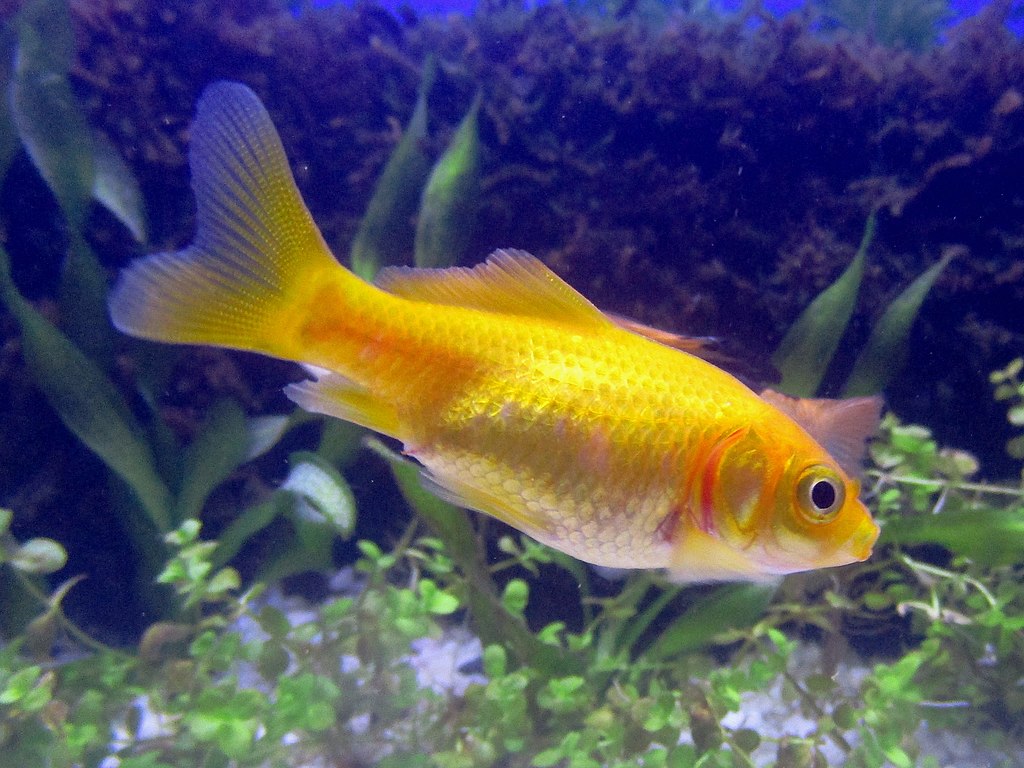
And you should get the result:
[1/4] Preprocessing image...

[2/4] Running model on board...
Time: 7.248ms

[3/4] Processing output...

[4/4] Classification Results:
  1. goldfish, Carassius auratus : 0.593750
  2. starfish, sea star : 0.019531
  3. triceratops : 0.015625
  4. rock beauty, Holocanthus tricolor : 0.011719
  5. cricket : 0.007812

Top Prediction: goldfish, Carassius auratus
Your timing and confidence scores may differ slightly.
You can look up class in the ImageNet classes list. It should have recognized the goldfish!
Classify another image
We can change a command line parameter to classify another image. Running:
python3 run_cli.py --image ../samples/cat.jpg

Should output the result:
Classification Results:
  1. Persian cat : 0.800781
  2. tabby, tabby cat : 0.714844
  3. tiger cat : 0.691406
  4. Egyptian cat : 0.683594
  5. lynx, catamount : 0.671875

Top Prediction: Persian cat
MobleNet correctly identifies this as a cat.
Additional options to try
--model, path to the model (default:../models/Synaptics/mobilenet_v2-int8-torq/MobileNetv2_int8.vmfb)--labels, path to the labels file (default:labels.json)--device, device to run on (default:torq)--display, display the annotated image
Models
This tutorial uses the following pre-compiled model for the SL2610-Series. See the model page for details, performance and download links:
Browse all models on the Models page.
Input sources
So far, we've been running image classification on single image examples. However, Astra pipelines can accept *.jpg images, a *.mp4 video, a /dev/video camera feed.
Explore other tutorials
Image classification is not designed to handle multiple subjects or identify where they are in an image. For that we need Object Detection.