
Music Generation: Jellectronica on SL2610-Series
Complete the Getting Started with SL2610 guide first. It covers setting up your board, cloning the examples, and creating the Python environment. Activate the environment with source .venv/bin/activate in each new terminal.
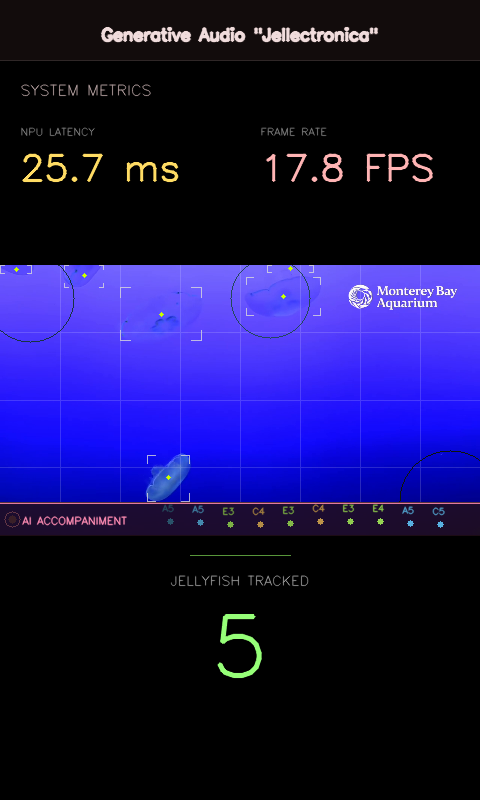
Jellectronica Lite turns a video stream into ambient music in real time. A YOLOv8 object detector runs on the Torq NPU, and the position of each detected object is mapped onto a musical grid. As creatures move through the frame they trigger notes, chords and arpeggios.
By default the demo watches a bundled jellyfish video. It can also use a live YouTube stream such as the Monterey Bay Aquarium moon jelly cam, an IP camera, or any video file.
An optional MelodyRNN layer listens to the triggered notes and generates an accompanying melody with a pre-trained Magenta LSTM. Everything runs on the board: NPU inference, melody generation, audio synthesis and rendering.
How it works
video source ─→ Torq NPU (YOLOv8 int8, 320x320) ─→ tracker (8x4 grid)
                                                      │
                          ┌───────────────────────────┼──────────────────┐
                          ▼                           ▼                  ▼
                     SoftSynth                   MelodyRNN           Display
                  (USB audio out)             (optional LSTM)     (DSI or browser)
When a detected object crosses a cell boundary in the 8x4 grid, it triggers a note. The four rows map to different instruments (arpeggios, pads, chords and bass), so more objects in the frame make a richer sound. The synthesizer and MelodyRNN are pure Python and NumPy, so no TensorFlow or Magenta package is required.
Run Jellectronica on Astra
Hardware
- Synaptics Coralboard or Astra Machina SL2619 kit
- A USB speaker or headset (or a Bluetooth speaker, see below)
- Optional: a Waveshare 7" DSI display. Without a display the app streams to a browser.
Install the example-specific dependencies and download the models:
cd jellectronica
pip install -r requirements.txt
python setup_demo.py
To use a Bluetooth speaker instead of USB audio, pair it using the Astra Linux Bluetooth guide.
Music from video on the edge
Headless mode: stream to a browser
python3 run_cli.py
Open http://<board-ip>:5002 in a browser on the same network. The video and detection overlay stream to the browser and the music plays through the board's speaker. Use --port to change the port.
Display mode: DSI or HDMI screen
Set up the display environment from the Getting Started guide (XDG_RUNTIME_DIR and WAYLAND_DISPLAY), and add:
export WESTON_DISABLE_GBM_MODIFIERS=true
For portrait mode on an 800x480 display:
export ORIENTATION=portrait
export DISPLAY_HEIGHT=800
export DISPLAY_WIDTH=480
Then start the app, which renders directly to the display:
python3 run_gui.py
Choose a video source
| Source | Option |
|---|---|
| Bundled jellyfish video (default) | no option needed |
| YouTube livestream (jelly cam) | --youtube |
| Another YouTube video | --youtube <URL> |
| Local file, IP camera or HTTP stream | --video <path-or-URL> |
python3 run_cli.py --youtube
python3 run_cli.py --video rtsp://192.168.1.100:554/stream
If YouTube is unavailable, or the stream goes black, the app falls back to the bundled video.
Additional options to try
--no-ai, turn off the MelodyRNN accompaniment--model <file>.vmfb, use a different detection model--audio-driver alsa --alsa-device hw:0,0, pick the audio output device
Make it your own
The musical grid works with any YOLOv8 detection model, and all detected objects trigger notes regardless of class. To make your dog, a bird feeder or street traffic play music:
Follow the steps in the blog Deploy a Custom YOLO Model on the Synaptics Torq NPU to create your own model. Here is a short summary:
- Train a YOLOv8 model on your objects with Ultralytics.
- Convert it for the NPU with the Torq compiler.
- Copy the
.vmfbfile to the board. - Run
python3 run_cli.py --model ../models/your_model.vmfb.
Models
This tutorial uses the following pre-compiled model for the SL2610-Series. See the model page for details, performance and download links:
Browse all models on the Models page.
Python walkthrough
detector.py, runs YOLOv8 on the Torq NPUtracker.py, tracks objects and maps them to the gridmusic_engine.pyandsoft_synth.py, the five-channel audio engine and built-in synthesizermelody_rnn.py, NumPy LSTM inference for the AI accompaniment
See the example's docs/architecture.md for more detail.
The jellyfish video is provided courtesy of the Monterey Bay Aquarium for non-commercial use only.